Archives
Container archives open in a TOC view — one row per entry with permissions, uncompressed size, mtime, and path. Listing reads only the per-entry headers, so multi-GB archives open instantly.
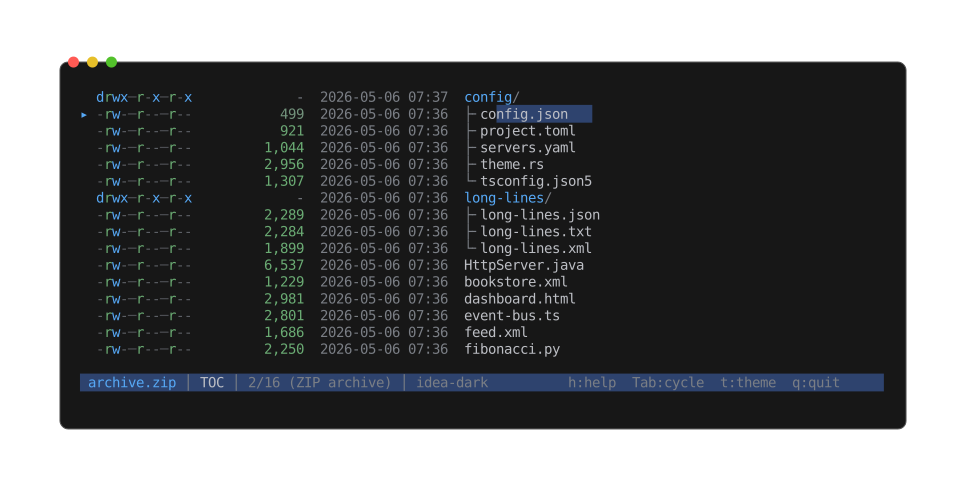
The interactive TOC browser: entries shown as a nested tree (directories with ├╴ / └╴
children), with permissions, size, and mtime per row. Move the cursor to descend into an entry
and preview it, or extract it.
| Format | Extensions | Spec |
|---|---|---|
| ZIP | .zip, .jar, .war, .apk | PKWARE APPNOTE |
| Tar | .tar | POSIX ustar |
| Tar + gzip | .tar.gz, .tgz | |
| Tar + bzip2 | .tar.bz2, .tbz2 | |
| Tar + xz | .tar.xz, .txz | |
| Tar + zstd | .tar.zst, .tzst | |
| Tar + lz4 | .tar.lz4, .tlz4 | |
| Tar + brotli | .tar.br, .tbr | |
| 7-Zip | .7z | 7-Zip format |
| cpio | .cpio (+ .cpio.gz) | newc / ODC headers; old-binary not supported |
| ar / Debian | .ar, .deb, .a | Unix ar(1) archive (also Debian binary packages) |
Navigation
The regular scroll keys move a file-selection cursor (skipping directories). The selected leaf gets a highlighted background + arrow marker. Top / bottom jump to the first / last file; paging scrolls a screenful and snaps the selection to the first visible file.
A sticky parent breadcrumb pins the current top row's ancestor chain to the upper viewport
rows when scrolled. Toggle with s.
Enter descends into the selected entry (recursive peek — opens it through the full peek
pipeline as if it were a standalone file). e extracts; see
Extraction.
Info view
Entry count, file count, directory count, total uncompressed size. Listing failures (corrupt archive, unsupported variant) surface as a warning row.
When an ar archive turns out to be a static library — its members are object files (.a /
.lib) — the Info view adds a Static library section with the object-member count and the target
architecture. A non-object ar archive like a .deb doesn't show it.
Single-stream compression
Bare codec wrappers (without a tar inside) decompress transparently — peek opens straight to the inner content rendered as whatever it actually is (source, JSON, image, …), and the Info view adds a Compression row showing the codec plus before / after sizes.
| Format | Extension |
|---|---|
| gzip | .gz |
| bzip2 | .bz2 |
| xz | .xz |
| zstd | .zst |
| lz4 | .lz4 |
| brotli | .br |
There is no fixed decompressed-size cap; output over 16 MiB spills to a tempfile to bound RAM. A decompression bomb above 8 GiB — or any corrupt or truncated stream — surfaces a warning and the viewer falls back to a hex view of the raw compressed bytes.
Brotli is the one exception to magic-byte detection: a raw brotli stream carries no signature,
so .br / .tar.br are recognised by extension only — a brotli stream piped through stdin
without a filename won't be auto-detected.