SQLite databases
| Format | Extensions |
|---|---|
| SQLite 3 | .sqlite, .sqlite3, .db, .db3 |
peek opens SQLite databases read-only — the schema, the row counts, and the rows
themselves. peek never writes to the database; connections always carry the
SQLITE_OPEN_READ_ONLY flag. The bundled SQLite library is compiled into the peek
binary, so there's no system libsqlite to install.
Landing view: the schema listing
Opening a database lands on a tree-shaped listing of every user-facing schema object, grouped by kind:
tables/
  ├╴books.sql
  ├╴books.csv
  ├╴authors.sql
  ├╴authors.csv
  …
views/
  ├╴popular_authors.sql
  └╴popular_authors.csv
indexes/
  ├╴idx_books_language.sql
  …
triggers/
  …
Each table and view contributes two leaves:
<name>.sql— theCREATE …DDL for the entity.<name>.csv— the entity's contents (rows).
Indexes and triggers only get the .sql leaf — they aren't row-bearing on their own.
Empty kind groups are omitted entirely (no empty triggers/ block on a DB without
triggers).
The listing's size column shows DDL byte length for schema rows and row count for contents rows, so the populations of different tables are comparable at a glance.
Schema view (<name>.sql)
Enter on a schema leaf pulls the entity's CREATE … statement from sqlite_master,
hands it to peek as an in-memory .sql source with a -- <name> from <db> header
comment, and the file-type detector routes it through the standard SQL syntax-highlight
view. Press Esc to return to the listing.
The schema leaf can also be extracted to disk with e — same as any archive entry.
Contents leaves (<name>.csv) extract too: e (or peek --extract tables/books.csv library.sqlite) streams SELECT * FROM "<entity>" through a CSV writer into a
tempfile and saves it where you point the prompt. Cell mapping in extracts:
NULL→ empty cell (standard CSV convention; lossy vs empty string).INTEGER/REAL/TEXT→ their display form.BLOB→ SQL hex literalX'68656c6c6f'. Lossless and round-trippable into anINSERTstatement, at the cost of size for large blobs.
Contents view (<name>.csv)
Enter on a contents leaf opens a streaming row view:
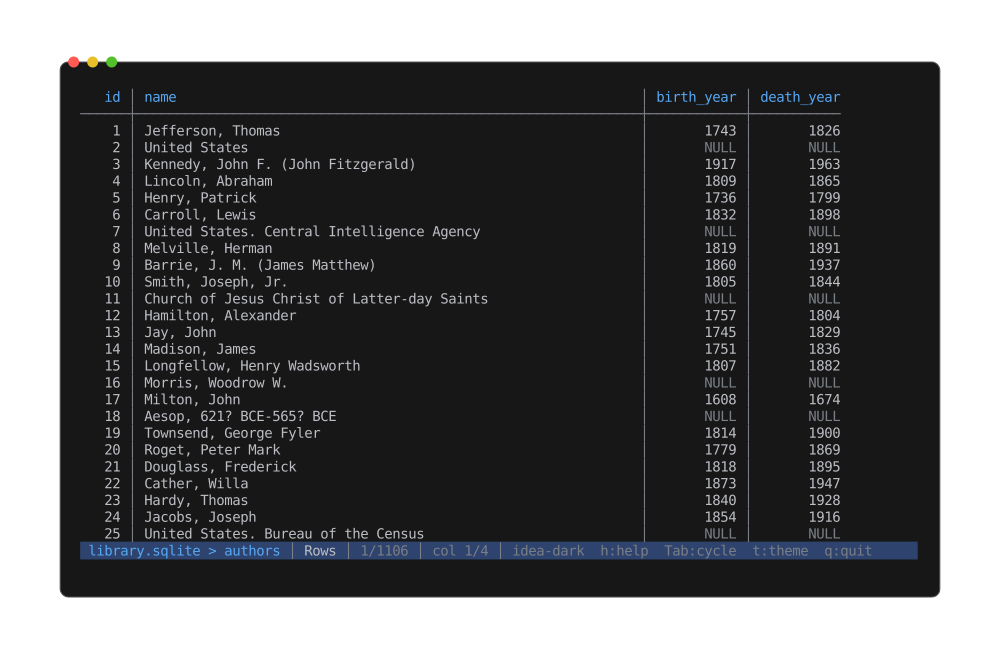
A table's rows, drawn as an aligned table — the same renderer CSV uses, fed by a SQLite cursor. Empty cells are NULLs; the body scrolls a 1000-row sliding window without loading the whole table.
- Sticky header row with the column names.
- Body rows fetched lazily — a sliding window of 1000 rows is held in memory and the
buffer refills with a new
SELECT * FROM "<entity>" LIMIT 1000 OFFSET kwhenever scrolling moves the viewport outside the current window. - Total row count is known up front (one
COUNT(*)at open), soG/ Bottom lands at the true last row without paginating through the whole table. - Cell-scoped
/search;n/pstep matches.
Per-column alignment follows the declared type affinity: INT / REAL / NUMERIC /
DECIMAL columns right-align so digit grids line up; everything text-shaped
(CHAR / TEXT / CLOB / DATE / TIME / BOOL) stays left.
Shift+R reflows widths from the visible window (opt-in shrink); Shift+H toggles the
header row. Horizontal pan with Left / Right when the table is wider than the
terminal.
The contents view shares its rendering with the CSV viewer — it's the same
RowsTableMode underneath, just fed by a SQLite cursor instead of a CSV reader.
NULL and BLOB cells
NULLcells render as a placeholder — they're distinct from the empty string.BLOBcells render as<blob: N bytes>. Inline hex preview is deferred; use the schema view to see the column's declared type.
Search caveat
Cell-scoped search pages the 1000-row window across the table, so it reaches past the
rows currently buffered, but the walk is budgeted at 256 MB of cell text per query — a
capped scan marks its counts as partial (12/3400+, no match (partial scan)) and
raises a warning. Predicate-pushdown queries (LIKE / GLOB) are planned.
Info section
The Info view (Tab) shows:
- File-level: page size, page count, encoding, journal mode, schema version, user
version, application ID (when non-zero),
PRAGMA integrity_check(1)result. - Schema counts: tables, views, indexes (when any), triggers (when any), total rows across all tables.
- A "Biggest tables" block listing up to five tables by row count.
Stdin / piped databases
Piping a database into peek (cat lib.sqlite | peek) works — peek spools the bytes to
a temporary file and opens the connection against that. The temp file unlinks when
peek exits.
Limitations
- Cell-scoped search scans at most 256 MB of cell text per query (counts marked partial past it).
WAL/-journal/-shmsidecar files are not inspected.- SQLCipher-encrypted databases are not supported.
- A custom-query prompt (
:SELECT …) is not implemented.