Introduction
peek is a modern terminal file viewer — preview any file, any format.
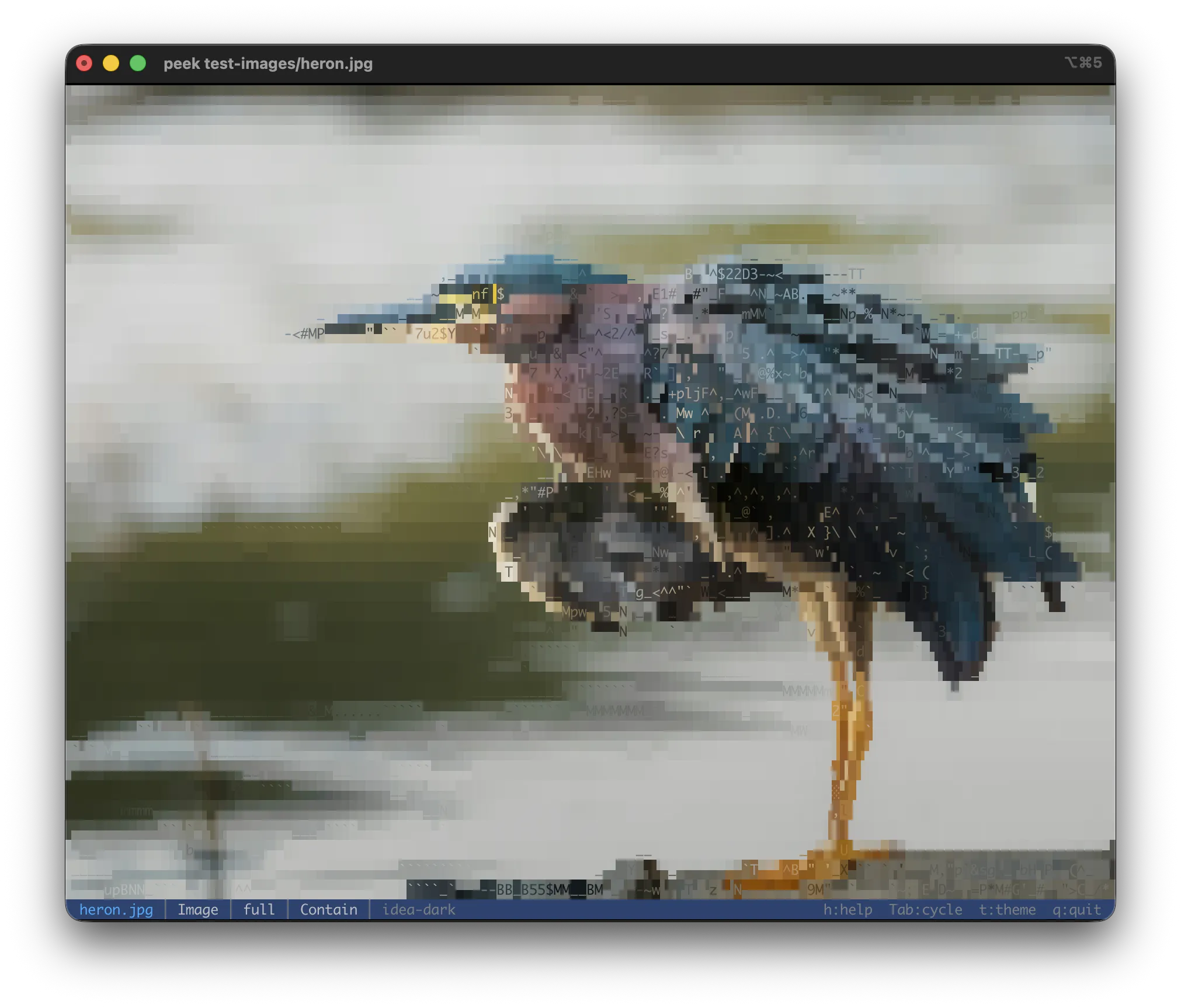
peek rendering a JPEG directly in the terminal — each cell is a character whose shape and 24-bit color approximate the underlying pixels. Open any image file to get this view.
Features at a glance:
- Syntax-highlighted source code (100+ languages)
- Markdown rendered with CommonMark + GFM (tables, task lists, footnotes, frontmatter)
- Pretty-printed structured data (JSON, YAML, TOML, XML)
- ASCII-art image rendering with 24-bit color
- Animated GIF / WebP / animated SVG playback
- Office documents (DOCX, ODT, RTF), PDF, Adobe Illustrator (
.ai), EPUB - Spreadsheets (
.xlsx,.xlsm,.ods) — sheet listing, aligned table per sheet - EPS / PostScript (
.eps,.ps) — embedded preview, optional Ghostscript render - Audio metadata + embedded cover art
- Archive browsing (ZIP, tar, 7-Zip, cpio) and disk images (ISO, DMG)
- PEM certificates and keys — subject, validity, SANs, fingerprints
- Hex dump for unknown binary
- Interactive viewer with live theme cycling, file info, extraction
Design principles
Single-file viewer. One path (or stdin) at a time. No batch mode, no file list, no cat-style
concatenation — those use cases belong to other tools. Run peek once per file.
Stream, don't load. Multi-GB files are first-class. Archives open instantly via header walks; hex dump reads from disk on demand. Whole-file reads only when the format truly needs it.
Auto-detect. Magic bytes for binary content, sniffing for structured text on stdin. The filename is a hint, not the source of truth.
Installation
macOS / Linux (recommended)
curl -fsSL https://raw.githubusercontent.com/thaapasa/peek/main/install.sh | sh
Installs the latest release into ~/.local/bin. Supported targets: aarch64 and x86_64 on
both platforms.
Overrides:
| Variable | Effect |
|---|---|
PEEK_VERSION | Pin a release tag, e.g. v0.3.2 |
PEEK_INSTALL_DIR | Install to a custom directory |
curl doesn't tag downloads with com.apple.quarantine, so macOS runs the binary directly — no
Gatekeeper prompt.
Manual download
Grab the .tar.gz for your platform from the
Releases page, verify against the .sha256,
extract, and move peek onto your PATH. The archive ships the Pdfium shared library
(libpdfium.dylib on macOS, libpdfium.so on Linux) alongside the binary — keep them in the
same directory so PDF support loads at startup. Without the dylib next to peek (or available
on the system loader path), PDF rendering is disabled; all other formats still work.
On macOS, if a browser quarantined the archive:
xattr -d com.apple.quarantine peek
Windows
Download the .zip for x86_64-pc-windows-msvc from the Releases page, extract, and add the
folder containing peek.exe to your PATH. Keep pdfium.dll (bundled in the archive) in the
same folder as peek.exe so PDF rendering loads at startup. Piping text into peek.exe
reopens the console via CONIN$ after consuming the pipe, so the interactive viewer launches
the same as on Unix.
From source
just pdfium      # fetch Pdfium dylib for PDF support (skip if you don't need PDF)
just install     # cargo build --release; install to $PEEK_INSTALL_DIR
just pdfium downloads bblanchon/pdfium-binaries
for your host platform and unpacks it into .pdfium/. just install copies both peek and
libpdfium.* into the install dir.
Pure-cargo alternative (works for everything except PDF unless the dylib is dropped next to the binary):
cargo install --path .
Updating
peek --update
Checks GitHub Releases and re-runs install.sh if a newer version is available.
Quick start
# Source code — syntax highlighted, interactive viewer
peek src/main.rs

# Markdown — rendered (headings, tables, code, task lists); Tab for source
peek README.md

# Structured data — pretty-printed
peek config.json
peek data.yaml

# Image — glyph-matched ASCII art
peek photo.jpg

# PDF — paged ASCII render, n/p step pages
peek report.pdf

# Certificate or key — subject, validity, SANs, fingerprints
peek server.pem

# Pipe — auto-detects JSON / YAML / XML
echo '{"a":1}' | peek
curl -s https://example.com/data.json | peek

# Force a syntax when piping plain text
cat src/main.rs | peek -L rust

# Direct stdout (no viewer)
peek --print file.txt
peek -p file.txt

# File metadata only
peek --info photo.jpg

# Browse an archive
peek release.tar.gz

# Extract one file from an archive
peek release.tar.gz --extract README.md -o README.md
See Operating modes for how viewer vs print is selected, and File types for the supported formats.
Operating modes
peek runs in one of four output modes (plus --extract / -x, which writes a single inner
item to disk or stdout):
| Mode | Trigger | Behavior |
|---|---|---|
| Viewer | Stdout is a TTY (default) | Full-screen interactive viewer |
--print/-p or stdout is piped | Direct stdout, no interactivity | |
| Info-only | --info | Print metadata and exit |
| List-only | --list | Print container TOC and exit (archives, ISOs, directories, PDF / EPUB / DOCX / ODT / RTF / audio / comic embeds) |
Binary files default to the hex-dump viewer when interactive; piped binary streams a hex dump.
Input
peek is a single-file viewer: at most one positional argument. To view several files, run peek once per file.
| Scenario | Stdin is TTY | Stdin is piped |
|---|---|---|
peek (no args) | Show short help | Read stdin, render |
peek - | Read stdin (blocks until Ctrl-D) | Read stdin, render |
peek file.rs | View file normally | View file (stdin ignored) |
Stdin is auto-detected by magic bytes (images, binary) and content sniffing (JSON, YAML, XML,
SVG, HTML). Plain text falls back to --language for syntax highlighting.
After consuming piped stdin, peek reopens the terminal so the interactive viewer's keyboard input still works.
Output
- Viewer: full-screen, alt-screen, no scrollback pollution. Quit returns the terminal unchanged.
- Print: streams to stdout. Safe to pipe into
less,grep,head.--plain/-Pstrips ANSI escapes, pretty-printing, and rich renders. --info: prints the file info screen and exits.--list: prints the container TOC and exits — works for archives, ISOs, directories, and per-page / per-file embed listings in PDF / EPUB / DOCX / ODT / RTF / audio / comic files.
Keyboard shortcuts
All shortcuts apply to the interactive viewer. Press h or ? in the viewer for the live
help screen — that's the authoritative reference.
Navigation
| Key | Action |
|---|---|
q, Ctrl+c | Quit |
Esc | Back / close current peek / clear search (quits at top level) |
Up, k | Scroll up |
Down, j | Scroll down |
PgUp, u, Ctrl+B, Ctrl+U | Page up |
PgDn, d, Ctrl+F, Ctrl+D | Page down |
Home, g | Go to top |
End, G | Go to bottom |
Left / Right | Pan horizontally |
The u / d and Ctrl paging aliases follow less / vim muscle memory. N is an alias
for p everywhere n / p step (search matches, pages, chapters, frames).
Views and modes
| Key | Action |
|---|---|
Tab / Shift+Tab | Cycle this file's view modes (forward / reverse) |
i | Jump to file info screen |
x | Toggle hex dump |
h, ? | Toggle help screen |
a | Toggle about screen |
t / T | Cycle theme (forward / reverse) |
c / C | Cycle output color mode (forward / reverse) |
Text views
| Key | Action |
|---|---|
l | Toggle line numbers |
w | Toggle soft line wrap |
r | Toggle pretty / raw (structured data) |
/ | Open the search prompt |
Ctrl-R | Toggle literal / regex (in the prompt) |
n / p | Next / previous search match |
Search defaults to exact-substring; press Ctrl-R in the prompt to switch to a regular
expression (the prompt title shows Search (literal) or Search (regex)). Either way matching
is smart-case: an all-lowercase query matches case-insensitively, any uppercase character makes
it case-sensitive. Type the query and press Enter to run it — the viewer jumps to the first
match. n / p cycle through matches (wrapping at the ends); the status line shows cur/total,
prefixed with regex while a regex search is active. A malformed regex shows the parse reason
and keeps your previous search. Regex matches one line at a time, so ^ and $ anchor to line
bounds and a pattern can't span a line break. Esc while a search is active clears the matches
(press it again to leave the viewer); an empty-query Enter also clears the search.
On very large files the text view and the CSV / SQLite table view scan the first 256 MB per
query so the viewer never freezes for a multi-gigabyte read; a capped scan marks its counts
as partial (12/3400+, no match (partial scan)) and raises a warning.
The same / search works in the rendered HTML view, the EPUB, DOCX / ODT / RTF, and PDF read
views. In the EPUB Read view n / p normally step chapters — while a search is active they
navigate matches instead, and Esc clears the search to get chapter stepping back.
Image views
| Key | Action |
|---|---|
m / M | Cycle render mode (full / block / geo / ascii / contour) |
b / B | Cycle background (auto / black / white / checkerboard; checker aliases checkerboard) |
f | Cycle fit mode (Contain / FitWidth / FitHeight) |
+, = / - | Zoom in / out (1.25× per step, capped at 16×) |
0 | Reset zoom to 1× and pan to origin |
1..9 | Jump to whole-number zoom (1× .. 9×) |
Zoom anchors on the viewport centre — the pixel under the centre
stays put across + / -. The same zoom keys work in animation,
PDF / CBZ, and font specimen views. See
Zoom & pan for full behaviour.
Animation views (GIF / WebP / animated SVG)
| Key | Action |
|---|---|
Space | Play / pause |
n / p | Next / previous frame |
e | Extract current frame as a PNG |
Listings (archives, PDF embeds, audio embeds, ISO, directories)
| Key | Action |
|---|---|
Up / Down | Move selection |
Enter | Descend into selected entry (recursive peek) |
Backspace | Up one directory level |
z | Toggle exact bytes / human-readable sizes |
e | Extract selected entry |
s | Toggle sticky parent breadcrumb |
/ | Search leaf names (last path segment only) |
n / p | Next / previous match |
Backspace walks up a directory. In an on-disk directory listing it opens the parent
directory with the cursor on the subdirectory you came from (so repeated presses climb the
tree and you can step straight back in). In an archive / container TOC (zip, tar, ISO, epub, …)
it moves the selection onto the parent directory row — directory rows are selectable, so the
cursor lands right above their contents and each press climbs one level.
z toggles the size column between exact byte counts (thousands-separated) and human-readable
units (KiB/MiB/GiB); the status line shows human sizes while the latter is active. Exact bytes
are the default, and --list / --print output always stays exact.
Listing search matches the last path segment of each row only — sub/ finds nothing because
no leaf carries a slash. Directory leaves participate so a search for an ancestor name brings
that subtree into view; the file selection only moves when the active match lands on a file
row, so Extract / Descend still target a descendable entry.
CSV / TSV table
| Key | Action |
|---|---|
Shift+H | Toggle the header row |
Shift+R | Reflow column widths from the viewport (opt-in shrink) |
Left / Right | Pan one column left / right |
/ | Search inside cells (single-cell scope) |
n / p | Next / previous match |
CSV search is scoped to a single cell — a query that would span the delimiter between two
columns yields nothing. n / p cycle through matches and pan / scroll to bring each
match's cell into view.
Multi-page / multi-chapter (PDF, EPUB, CBZ)
| Key | Action |
|---|---|
n / p | Next / previous page (or chapter) |
o | Toggle reconstructed-text overlay (PDF read view) |
Font specimen (multi-face .ttc / .otc)
| Key | Action |
|---|---|
n / p | Next / previous face |
File types
peek auto-detects the file type by extension and magic bytes. Where the detected type has a dedicated viewer, that viewer runs; otherwise peek falls back to the hex dump.
| Category | Formats |
|---|---|
| Source code | 100+ languages via syntect (Rust, Python, Go, TS, …) |
| Markup | Markdown, HTML, XML, SQL |
.eml messages, .mbox mailboxes | |
| Calendar/contacts | iCalendar (.ics), vCard (.vcf) |
| Notebooks | Jupyter (.ipynb) |
| Structured data | JSON / JSONC / JSON5 / JSONL, YAML, TOML, XML |
| Tabular data | CSV, TSV (aligned table view) |
| Databases | SQLite (schema listing + streaming row viewer) |
| Spreadsheets | .xlsx, .xlsm, .ods (sheet listing → table per sheet) |
| Presentations | .pptx, .pptm, .ppsx, .odp (slide text); .key (preview) |
| Documents | DOCX, ODT, RTF |
| PDF / Illustrator | .pdf, .ai (paged render + text + embeds) |
| EPS / PostScript | .eps, .ps (embedded preview + Ghostscript render + DSC info) |
| Ebooks | EPUB |
| Images | PNG, JPEG, GIF, WebP, BMP, TIFF, ICO, AVIF, PNM, TGA, EXR, QOI, DDS |
| Vector | SVG (incl. CSS @keyframes animation) |
| Audio | MP3, FLAC, Ogg, Opus, WAV, MPEG-4, AAC, AIFF, CAF, MKA, WMA |
| Archives | ZIP, tar (+gz/bz2/xz/zst/lz4/br), 7-Zip, cpio, ar / .deb |
| Compression | gzip, bzip2, xz, zstd, lz4, brotli (bare wrappers) |
| Comic archives | CBZ |
| Disk images | ISO 9660, DMG (UDIF trailer) |
| Filesystem | Directories (one-level listing) |
| Executables | ELF, Mach-O, PE / COFF, WebAssembly (.wasm) object files |
| Java classfiles | .class files — header, fields, methods |
| Certificates | PEM X.509 / CSR / CRL / keys / OpenSSH public keys |
| Fonts | TrueType, OpenType, TTC / OTC collections, WOFF / WOFF2 (metadata + specimen render) |
.DS_Store | Apple Finder store — records table (icon / window / view settings) |
| Binary / unknown | Hex dump (hexdump -C style) |
Detection logic:
crates/peek-detect/.
Source code
Source files render as syntax-highlighted text via syntect with two-face / bat extended grammars — 100+ languages including Rust, Python, JavaScript, TypeScript, C, C++, Java, Go, Ruby, Shell, TOML, Dockerfile.
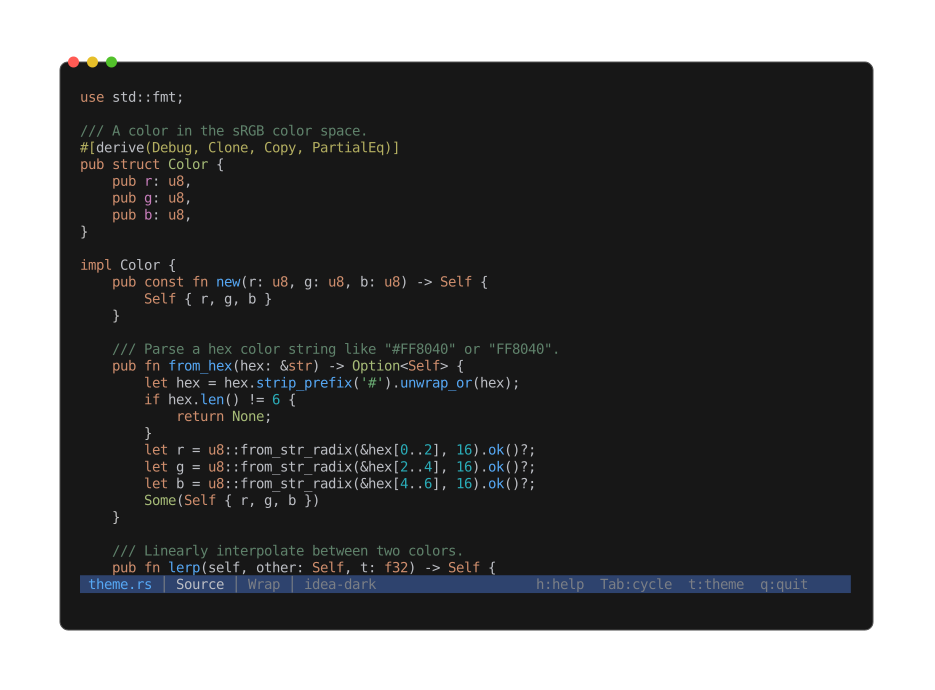
Highlighting applies automatically when you open a recognized source file; the theme follows the active color theme.
If detection misses, force a language with -L:
cat script | peek -L bash
peek -L rust unknown_file
Config files
Config files highlight through the same path — .ini, .cfg, .conf, .properties, .env,
.hcl, .tf, and by-name matches like Makefile, Dockerfile, .gitignore, and
.editorconfig. A few filename special cases cover gaps where the extension misleads or is
absent: .env.local / .env.production / .envrc highlight as .env, justfile uses the
Makefile grammar, and .dockerignore uses the gitignore grammar. Formats with no grammar
(.dhall, .cue) show as plain text.
Line numbers
Off by default. Enable at startup with -n / --line-numbers, or toggle with l in the viewer.
Soft wrap
On by default. Toggle with w. When off, Left / Right pan the viewport horizontally
(less -S feel).
SQL
.sql / .ddl / .dml / .psql / .pgsql files render as highlighted source. The Info view
adds an SQL section: dialect guess (PostgreSQL / MySQL / SQLite / T-SQL / generic), statement
count broken down by category (DDL / DML / DQL / TCL / Other), inventories of created objects (tables,
views, indexes, functions, triggers), comment-line count, and a flag when an inline $$ … $$
PL/pgSQL block is present.
CSS
.css files render as highlighted source. The Info view adds a CSS section: style-rule count
(CSS nesting included), selector count with a per-kind histogram (class / id / element / pseudo /
attribute / universal), custom-property count, @media and @keyframes counts, and an @import
list — external URLs flagged. A Colors section shows the stylesheet's colour palette as block
swatches, most-frequent first. Colour words inside selectors, strings, or comments are not
mistaken for colours.
Markdown
.md / .markdown / .mdown / .mkd / .mkdn / .mdwn files get a dual view, same as HTML
and PDF:
- Rendered (default) — pulldown-cmark drives a CommonMark + GFM walker that emits
width-wrapped, ANSI-styled text. Styled headings (with H1 / H2 underlines), bullet / ordered /
task lists (
☐/✓), blockquote rail, horizontal rules, tables as box-drawing, fenced code blocks syntect-highlighted by their declared language, emphasis / strong / strikethrough, inline code, links (text underlined + dim URL after), images, and footnote references and definitions. YAML (---) and TOML (+++) frontmatter render as a dim verbatim block at the top so the opening fence doesn't get mistaken for a horizontal rule. - Source — syntax-highlighted markdown source via
ContentMode. Reachable with Tab. Becomes the entry view with--raw.
--plain drops the rendered view entirely.
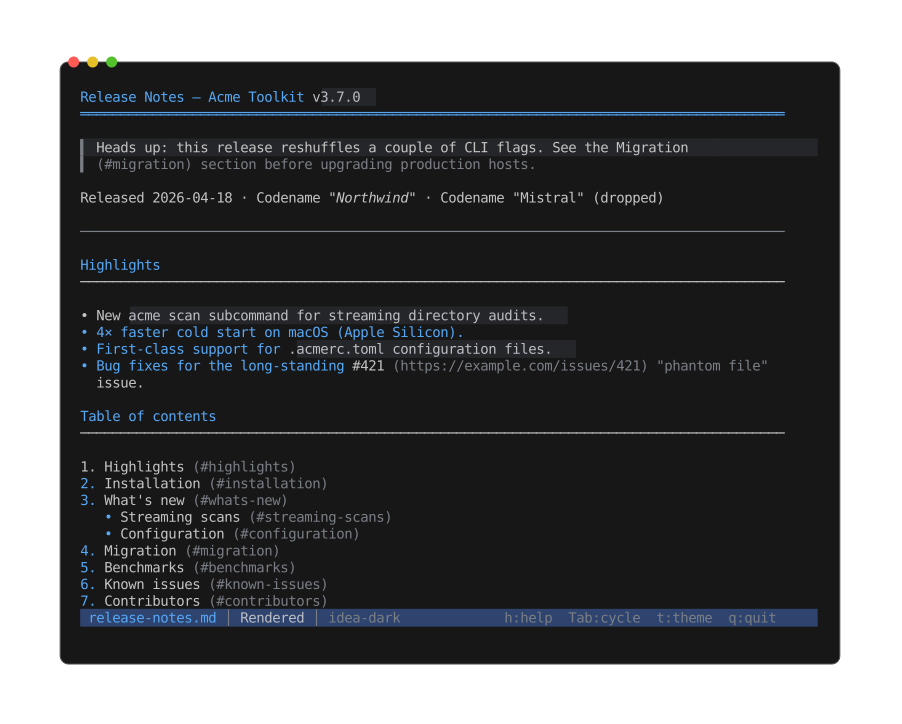
The default rendered view: headings, emphasis, strikethrough, blockquotes, and tables styled inline rather than shown as raw markup.
The Info view adds a Markdown section:
- Heading counts by level (H1..H6)
- Fenced code-block count + declared languages
- Inline-code / link / image / table / list-item counts
- Task-list progress (
done / total + percent) - Blockquote lines, footnote definitions
- Frontmatter detection (YAML / TOML)
- Prose word count (excludes fenced code)
- Reading-time estimate at 230 wpm
Jupyter notebooks
.ipynb files are JSON documents of cells. peek renders the cells instead of dumping the raw JSON,
with a dual view like Markdown:
-
Rendered (default) — the notebook is translated to a single Markdown document and rendered through the Markdown pipeline:
- Markdown cells render as prose (headings, lists, emphasis, tables, …).
- Code cells show an
In [n]:label and the source as a fenced block, syntax-highlighted in the kernel language. - Outputs appear under each code cell:
stdout/stderrstreams andtext/plainresults as fenced text,erroroutputs as a boldename: evalueline followed by the traceback (ANSI colour stripped), and image outputs noted by name (matching the Blocks listing, e.g.image-1.png).
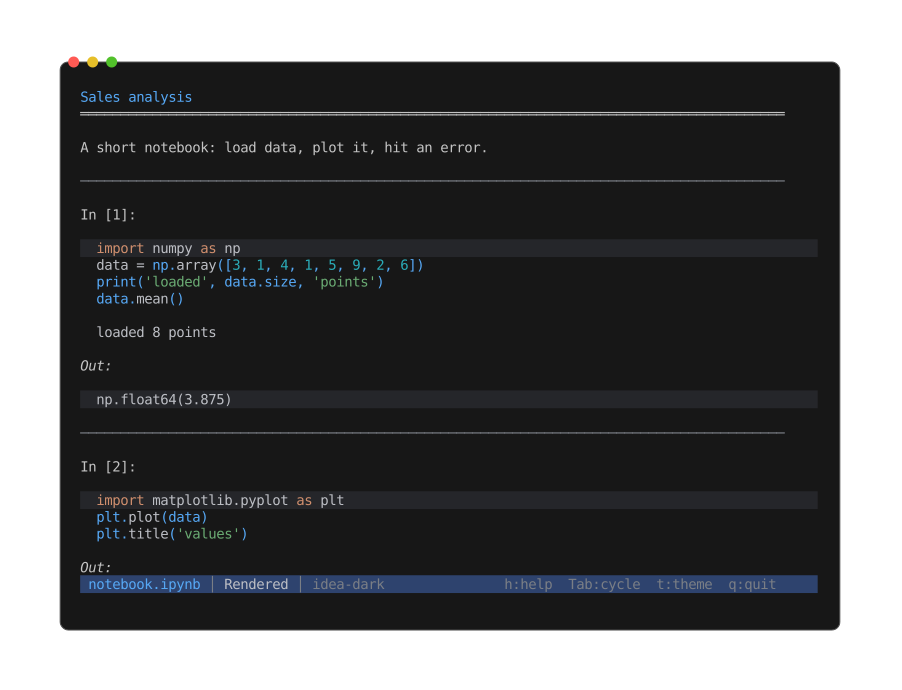
The rendered view: markdown prose, an
In [n]:code cell highlighted in the kernel language, and the cell's output below it. -
Source — the raw notebook JSON, pretty-printed via the structured content mode. Reachable with Tab;
rtoggles the raw (unformatted) JSON. Becomes the entry view with--raw. -
Blocks — a flat table of contents listing every code cell and image output as an ordered sequence with readable names (
code-1.py,image-1.png, …) rather than the notebook's opaque cell ids. From this view you can:- Extract (
e) the selected block — a code cell saves as its.py(or kernel-language) source, an image saves as the decoded.png/.jpg/.svg. Same aspeek --extract code-1.py notebook.ipynb. - Descend (Enter) into the block — peek recurses over an in-memory copy: code opens
syntax-highlighted, images render as ASCII art.
Escreturns to the notebook. peek --list notebook.ipynbprints the block names and sizes to stdout.
- Extract (
--plain drops the rendered view entirely.
Both nbformat 4 and the older nbformat-3 worksheets layout parse.
In the rendered view, image outputs are noted by name (
🖼 image-1.png), not drawn inline — drawing them inside the scrolling text is a planned follow-up. To see an image now, open the Blocks view and descend (Enter) into it.
The Info view adds a Notebook section:
- nbformat version
- Kernel display name and language (+ version)
- Cell count, split into code / markdown / raw
- Output count, with image / error sub-counts
- Highest execution count
HTML
.html / .htm / .xhtml (and stdin streams that start with <!DOCTYPE html> or <html) get a
dual view:
- Rendered (default) — lynx-style flow via the
html2text crate: paragraph wrap to terminal width, list
bullets, table grid, numbered link references, ANSI styling for
<strong>/<em>/<code>/<s>/<a>plus author colors from inlinestyle="..."and<style>rules. Near-grayscale author colors are filtered so body / heading defaults don't fight the terminal foreground. - Source — raw HTML with XML syntax highlighting. Tab cycles between the two.
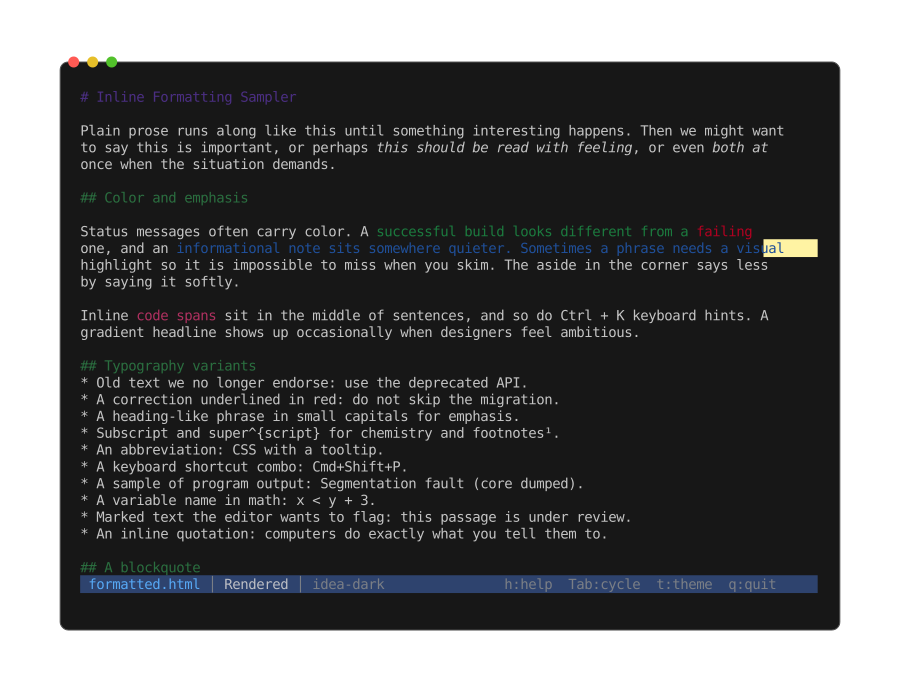
The default rendered view: lynx-style flow with paragraph wrap, list bullets, and ANSI styling from author colors rather than raw tags.
The Info view shows structured XML stats (root element, element counts).
| Format | Extension | Notes |
|---|---|---|
| Message | .eml | A single RFC822 / MIME message |
| Mailbox | .mbox | Many messages concatenated, each preceded by a From line |
Both parse with the pure-Rust mail-parser crate. peek also recognises a message by content, so
an extension-less file still opens here when it starts with a From separator (mbox) or an
RFC822 header block.
.eml — a single message
Cycled with Tab:
- Message (default) — a header block (From / To / Cc / Date / Subject, plus an attachment
count when the message has attachments) followed by the body. HTML messages render through the
same
html2textdriver as the HTML viewer; plain-text messages are word-wrapped to the terminal width. - Source — the raw RFC822 text.
--plainskips the rendered view and opens straight on the source. - Attachments (only when the message has any) — one row per MIME attachment with its content
type and size.
Press
eto extract the selected attachment to disk;Enteropens it with a recursive peek. - Info — the header summary (see below).
As with every file, x opens the hex dump and h / ? the help screen.
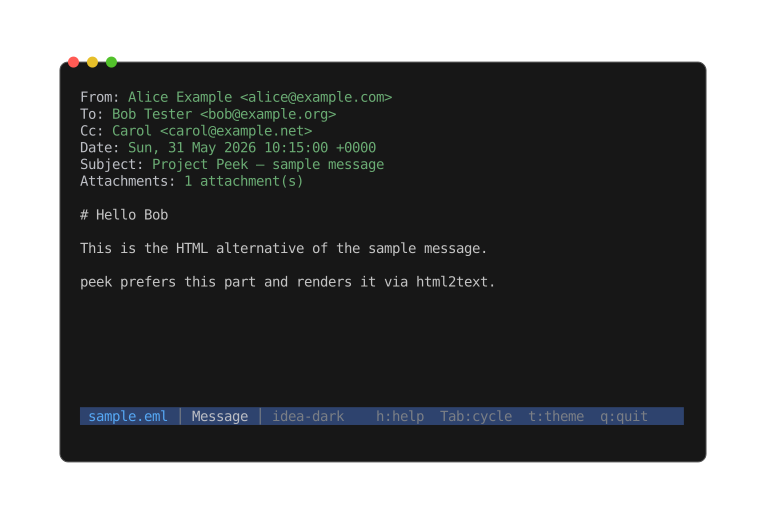
The default Message view: the header summary followed by the rendered body.
.mbox — a mailbox
The default view is a Messages list, one row per message (prefixed with its position so
duplicate subjects stay distinct, with the message date alongside). Press Enter to drill into a
message — it opens with the same views as a standalone .eml (Message, Attachments, Info, hex,
help), minus the per-message raw Source view: the mailbox's own raw text is the secondary
top-level view instead. The mailbox is read as a stream and only the opened message is parsed, so
even a very large mailbox lists instantly.
Info
The Info view shows the header summary plus the attachment count and total size (.eml), or the
message count (.mbox).
Calendar and contacts
| Format | Extensions | Notes |
|---|---|---|
| iCalendar | .ics .ical .ifb | Calendar of events and todos |
| vCard | .vcf .vcard | One or more contacts |
These are the two IETF "vObject" text formats, exported by Google Calendar, Apple Calendar,
Outlook, and most address books. peek also recognises them by content, so an extension-less file
(or piped stdin) still opens here when it starts with a BEGIN:VCALENDAR or BEGIN:VCARD line.
Both open on a rendered read view, with the raw text as a second view (cycle with Tab). --plain
skips the rendered view and opens straight on the source. As with every file, x opens the
hex dump, i the Info screen, and h / ? the help.
iCalendar — an agenda
The rendered view lists each event and todo in turn: a summary heading, the date and time (with
the time zone shown as written — peek doesn't convert zones), location, a readable recurrence rule
(Weekly on Mon, Tue, Wed, Thu, Fri, 40 times), organizer and attendees, status, categories, and
the description. Todos show their due date and completion status.
The Info view summarises the calendar: its name, the event and todo counts, the date range events span, the format version, and the producing application.
vCard — contact cards
The rendered view shows one grouped card per contact: the display name, nickname, organisation, title, every email / phone / address with its type label (work, home, cell, …), website, birthday, categories, and notes. Both vCard 3.0 and 4.0 cards are handled.
The Info view shows the contact count and the vCard version.
Structured data
| Format | Extensions |
|---|---|
| JSON | .json, .geojson |
| JSONC | .jsonc |
| JSON5 | .json5 |
| JSON Lines | .jsonl, .ndjson |
| YAML | .yaml, .yml |
| TOML | .toml |
| XML | .xml |
Pretty vs raw
Two sub-modes, toggled with r (or --raw on the CLI):
- Pretty (default for JSON / JSONL / YAML / TOML / XML) — reformatted, with syntax highlighting.
- Raw — verbatim source, still highlighted unless
--plain/-Pis set.
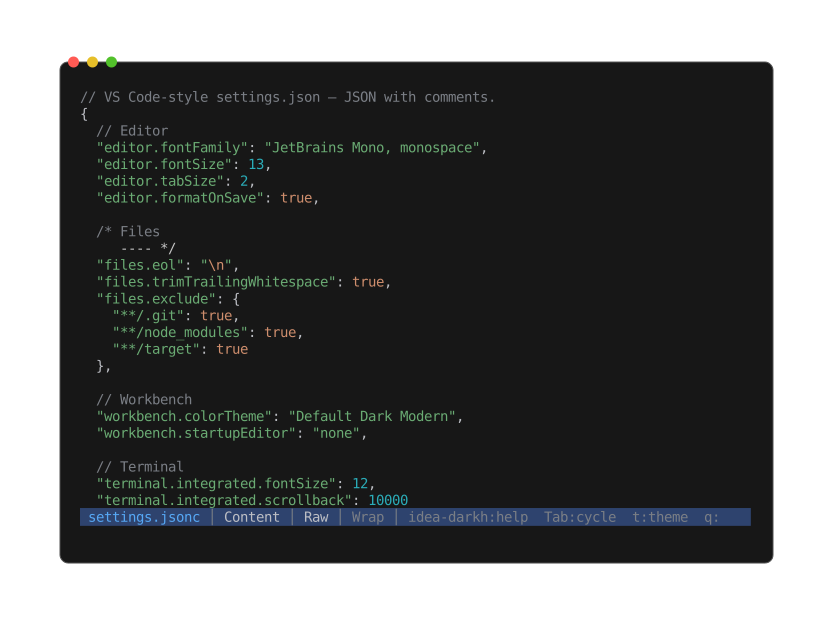
Keys, strings, numbers, and booleans each colored — comments preserved, source formatting intact (JSONC defaults to raw rather than pretty).
JSONC and JSON5 default to raw because the pretty path collapses comments and JSON5 syntax;
press r to opt into strict-JSON pretty when needed.
JSON Lines pretty: each non-empty line round-trips through serde_json separated by a blank
line.
Info view
Top-level kind, key/element count, max nesting depth, total node count. For XML, the root element name and declared namespaces.
CSV / TSV
| Format | Extensions |
|---|---|
| CSV | .csv |
| TSV | .tsv |
peek renders CSV and TSV files as an aligned table: sticky header row at the top, body rows scrolled underneath, columns padded to a common width per column.
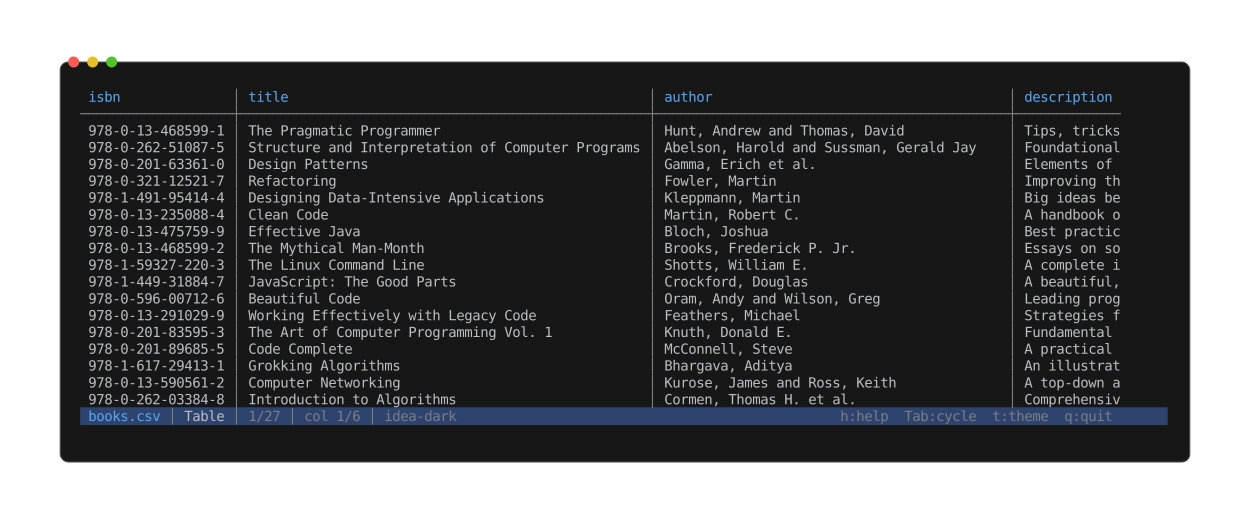
Columns are measured and padded to a common width; numeric columns right-align. The header stays pinned as you scroll the body.
View modes
- Table (default) — aligned columns with sticky header.
- Source — raw bytes through the text viewer.
- Info — per-column type inference, record count, malformed counter.
Tab cycles between them. x opens the hex view; h / ? show the help screen.
Column widths
Widths seed from the first 1000 records on open. As the user scrolls, columns grow monotonically — a wider cell scrolling into view bumps its column once and the new width stays (the sticky header repaints with the new layout so column titles stay aligned with the body). Columns never shrink on their own.
Shift+R reflows widths from the records currently visible in the viewport — the opt-in
shrink. One deliberate press beats constant automatic churn.
Cells wider than their column truncate with an ellipsis (…). The full value is visible in
the Source view.
Column alignment
Numeric columns (Int / Float only across the seed body) right-align so digits line up; everything else stays left-aligned. Alignment is inferred once from the seed and stays stable for the session — toggling the header doesn't reshuffle data alignment.
Multi-line cells
CSV records may embed \n inside a quoted cell. peek collapses each such cell to a single
visual row, replacing the embedded newline with a muted ↵ marker. Tabs become spaces and
carriage returns are dropped — none of those characters can break the terminal cursor or
push following columns onto the next row.
Header detection
Row 0 is treated as a header when every cell in row 0 looks like text (not int, float, bool, or ISO date). A typed cell in row 0 turns the heuristic off — clear signal that row 0 is data, not a label.
Shift+H toggles the header on / off, overriding the heuristic. When off, row 0 is body data
and the sticky region is empty.
Horizontal pan
If the table is wider than the terminal, Left / Right step one column at a time. The
sticky header pans in lockstep with the body. The status bar shows col N/total.
Delimiter detection
.csv defaults to comma, .tsv to tab. The first 64 KiB are sniffed for , / \t / ; /
|; if a non-default candidate outscores the default by 3× outside quoted spans, it
overrides — covers misnamed files.
Encoding
UTF-8 is native. UTF-16 LE and UTF-16 BE inputs are detected by BOM and transparently transcoded to UTF-8 at the byte-source boundary. The transcode holds the whole file in memory (unlike the streaming UTF-8 path), so it is capped at 32 MB — a larger UTF-16 file opens with the raw Source view only, and a warning explains why the table view is missing.
Malformed records
A record that exceeds 4 MiB or spans more than 10 000 physical lines is treated as malformed (defends against unterminated quoted strings). The csv crate's per-record errors (column-count mismatch, bad quoting, bad UTF-8) fall into the same bucket.
Malformed rows render as a single <error> cell painted in the theme's warning color, and
the status bar shows the running malformed count.
Search
/ opens the search prompt. Matches are scoped to a single cell — a
query that would span the comma between two columns yields nothing.
Substring scan, smart-case (all-lowercase query → case-insensitive; any
uppercase → case-sensitive). Search reaches past the loaded rows — peek
pages through the records without loading them all into memory — but the
scan is budgeted at 256 MB of record data per query so a multi-gigabyte
CSV never freezes the viewer; a capped scan marks its counts as partial
(12/3400+, no match (partial scan)) and raises a warning. n / p
step through matches, wrapping at the ends; the viewport scrolls
vertically and pans horizontally to bring each match's cell into view.
Esc clears the search.
Print mode
peek --print foo.csv (or piping into another tool) emits the table to stdout using the
seed widths only — no auto-widen. A cell wider than its seeded column prints in full and
pushes the rest of that row past the terminal edge (terminal clips); the next row realigns.
SQLite databases
| Format | Extensions |
|---|---|
| SQLite 3 | .sqlite, .sqlite3, .db, .db3 |
peek opens SQLite databases read-only — the schema, the row counts, and the rows
themselves. peek never writes to the database; connections always carry the
SQLITE_OPEN_READ_ONLY flag. The bundled SQLite library is compiled into the peek
binary, so there's no system libsqlite to install.
Landing view: the schema listing
Opening a database lands on a tree-shaped listing of every user-facing schema object, grouped by kind:
tables/
  ├╴books.sql
  ├╴books.csv
  ├╴authors.sql
  ├╴authors.csv
  …
views/
  ├╴popular_authors.sql
  └╴popular_authors.csv
indexes/
  ├╴idx_books_language.sql
  …
triggers/
  …
Each table and view contributes two leaves:
<name>.sql— theCREATE …DDL for the entity.<name>.csv— the entity's contents (rows).
Indexes and triggers only get the .sql leaf — they aren't row-bearing on their own.
Empty kind groups are omitted entirely (no empty triggers/ block on a DB without
triggers).
The listing's size column shows DDL byte length for schema rows and row count for contents rows, so the populations of different tables are comparable at a glance.
Schema view (<name>.sql)
Enter on a schema leaf pulls the entity's CREATE … statement from sqlite_master,
hands it to peek as an in-memory .sql source with a -- <name> from <db> header
comment, and the file-type detector routes it through the standard SQL syntax-highlight
view. Press Esc to return to the listing.
The schema leaf can also be extracted to disk with e — same as any archive entry.
Contents leaves (<name>.csv) extract too: e (or peek --extract tables/books.csv library.sqlite) streams SELECT * FROM "<entity>" through a CSV writer into a
tempfile and saves it where you point the prompt. Cell mapping in extracts:
NULL→ empty cell (standard CSV convention; lossy vs empty string).INTEGER/REAL/TEXT→ their display form.BLOB→ SQL hex literalX'68656c6c6f'. Lossless and round-trippable into anINSERTstatement, at the cost of size for large blobs.
Contents view (<name>.csv)
Enter on a contents leaf opens a streaming row view:
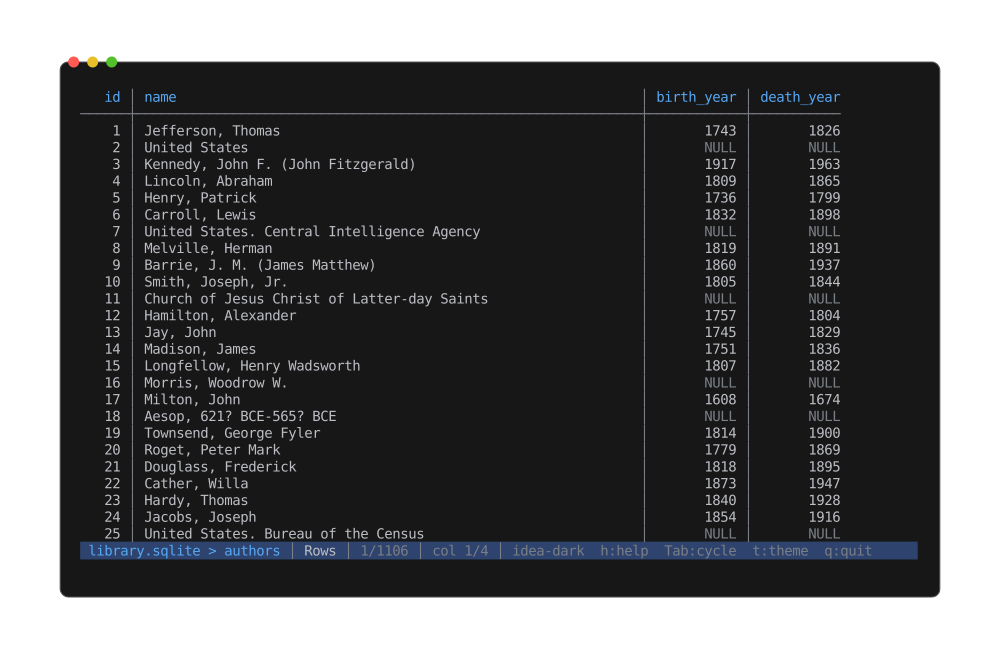
A table's rows, drawn as an aligned table — the same renderer CSV uses, fed by a SQLite cursor. Empty cells are NULLs; the body scrolls a 1000-row sliding window without loading the whole table.
- Sticky header row with the column names.
- Body rows fetched lazily — a sliding window of 1000 rows is held in memory and the
buffer refills with a new
SELECT * FROM "<entity>" LIMIT 1000 OFFSET kwhenever scrolling moves the viewport outside the current window. - Total row count is known up front (one
COUNT(*)at open), soG/ Bottom lands at the true last row without paginating through the whole table. - Cell-scoped
/search;n/pstep matches.
Per-column alignment follows the declared type affinity: INT / REAL / NUMERIC /
DECIMAL columns right-align so digit grids line up; everything text-shaped
(CHAR / TEXT / CLOB / DATE / TIME / BOOL) stays left.
Shift+R reflows widths from the visible window (opt-in shrink); Shift+H toggles the
header row. Horizontal pan with Left / Right when the table is wider than the
terminal.
The contents view shares its rendering with the CSV viewer — it's the same
RowsTableMode underneath, just fed by a SQLite cursor instead of a CSV reader.
NULL and BLOB cells
NULLcells render as a placeholder — they're distinct from the empty string.BLOBcells render as<blob: N bytes>. Inline hex preview is deferred; use the schema view to see the column's declared type.
Search caveat
Cell-scoped search pages the 1000-row window across the table, so it reaches past the
rows currently buffered, but the walk is budgeted at 256 MB of cell text per query — a
capped scan marks its counts as partial (12/3400+, no match (partial scan)) and
raises a warning. Predicate-pushdown queries (LIKE / GLOB) are planned.
Info section
The Info view (Tab) shows:
- File-level: page size, page count, encoding, journal mode, schema version, user
version, application ID (when non-zero),
PRAGMA integrity_check(1)result. - Schema counts: tables, views, indexes (when any), triggers (when any), total rows across all tables.
- A "Biggest tables" block listing up to five tables by row count.
Stdin / piped databases
Piping a database into peek (cat lib.sqlite | peek) works — peek spools the bytes to
a temporary file and opens the connection against that. The temp file unlinks when
peek exits.
Limitations
- Cell-scoped search scans at most 256 MB of cell text per query (counts marked partial past it).
WAL/-journal/-shmsidecar files are not inspected.- SQLCipher-encrypted databases are not supported.
- A custom-query prompt (
:SELECT …) is not implemented.
Spreadsheets
.xlsx, .xlsm, and .ods workbooks. A workbook is a set of named sheets, each a table, so
peek opens it like a small database: a list of sheets you drill into.
Modes
Cycled with Tab:
- Sheets (default) — the workbook's sheets.
Enteropens a sheet as an aligned table;esaves a sheet to a CSV file. - Files — the workbook's raw internal entries (an
.xlsx/.odsis a zip archive), browsable and extractable like any archive. - Info — sheet count and names, plus document properties (title, author, dates) when the file records them.
Sheet table
Opening a sheet shows the same aligned table view as CSV and SQLite: a sticky header row,
horizontal panning with Left / Right when the table is wide, and / cell search across
the whole sheet. Numeric columns right-align; text, dates, and booleans left-align. The first
row is treated as a header when it looks like one; Shift+H toggles that.
Formulas are not evaluated — peek shows the cached values stored in the file (the same values a spreadsheet app shows on open).
Notes
- A sheet is loaded into memory when you open it (the spreadsheet libraries peek uses don't stream sheet data). One sheet at a time — opening another releases the previous one.
- Legacy binary
.xlsis not supported; use.xlsx/.ods.
Presentations
.pptx, .pptm, .ppsx (PowerPoint / Office Open XML) and .odp (OpenDocument
Presentation) open as slide-by-slide text. Apple Keynote (.key) opens as a preview.
PowerPoint and OpenDocument
Modes
Cycled with Tab:
- Read (default) — one slide at a time. The slide title renders as a heading and the body text below it, the same styled prose view documents use.
- TOC — the deck's raw internal entries (a
.pptx/.odpis a zip archive), browsable and extractable like any archive. - Info — slide / word / image counts, plus document properties (title, author, subject, keywords, dates, creating application) when the file records them.
Navigating slides
n and p step to the next / previous slide; the status line shows slide X/Y. / searches
the current slide's text (while a search is active, n / p step matches instead — Esc
clears the search to get slide stepping back). --print writes every slide in order,
separated by a blank line.
Embedded pictures appear as [Image: name] markers in the slide text. The pictures themselves
aren't drawn inline, but they're listed in the TOC view and can be extracted or peeked
into directly.
Keynote
A .key file opens to its embedded preview — the deck thumbnail Keynote stores for
QuickLook — rendered as an image with the usual zoom / pan / fit controls. The TOC view
lists the package contents and Info shows the creating Keynote build.
Keynote stores its actual slide text in an undocumented internal format, so peek doesn't
extract slide text from .key files — the preview and the file listing stand in.
Notes
- Detection is by extension: like every Office / OpenDocument file these are zip archives, so a deck with no extension opens as a plain archive instead.
.keyshares its extension with PEM private keys; peek tells them apart by content (the Keynote package is a zip, a key is text).- Legacy binary
.pptis not supported; use.pptx/.odp.
Documents
| Format | Extensions | Format spec |
|---|---|---|
| DOCX | .docx | Office Open XML — ECMA-376 |
| ODT | .odt | OpenDocument |
| RTF | .rtf | Rich Text Format |
Modes
DOCX / ODT (both ZIP-packaged) get three views, cycled with Tab:
- Read (default) — styled body text. Headings render bold + themed; bold / italic /
underline / strikethrough runs render via SGR; explicit run colors apply. Bulleted lists use a
•marker indented per nesting level. Embedded images surface inline as[Image: <basename>]placeholders. Tables flatten to|-joined rows. Width-aware word wrap re-runs on resize. - TOC — the raw ZIP file tree. Inspect inner XML parts and embedded media;
Enterdescends recursively.--extract word/media/imageN.pngworks as for any ZIP archive. - Info — title, author, subject, keywords, created / modified timestamps, paragraph / word / image counts.
RTF opens to Read and Info by default. When the file embeds images as \pict groups,
a TOC view appears alongside, listing each embed; e / --extract pulls one out.
Caveats
- DOCX lists currently render as flat bullets — numbering cascade resolution from
numbering.xmlis not implemented; everything withnumPrshows as•. - ODT's
styles.xmlinheritance chain isn't consulted in v1. Real-world ODTs from LibreOffice / OpenOffice dump all directly-used styling intocontent.xml's automatic-styles, which is what peek resolves.
PDF & Adobe Illustrator
.pdf files use Pdfium (Google's PDF library,
dynamically loaded from libpdfium.* shipped alongside peek — no system install needed).
.ai files (Adobe Illustrator, 2005 onwards) are PDF documents internally, so they open
through the same modes — the Info section just labels them "Adobe Illustrator". Older
PostScript-only Illustrator files are not supported. A few .ai files keep their artwork
only in Illustrator-private data behind a blank visible PDF page; those render empty (Preview
and QuickLook show them blank too).
Modes
Cycled with Tab:
-
Read (default) — paged image render. Each page is rasterized via Pdfium and ASCII-rendered through the shared image pipeline.
n/pstep pages; the status line showspage X/Y. Zoom / pan via the standard keys (Zoom & pan). Per-page cache keyed by terminal size + render settings; resize or mode cycling re-renders only the visible page.otoggles the reconstructed-text overlay: real words from the PDF's text layer are written over the rendered glyph cells at their page positions, so zooming to roughly one text line per terminal row turns the pixel mush into readable sentences (around 2× zoom for a typical A4 page at full terminal width). Each word is centered in its rendered box and cropped to fit; when zoomed far past 1:1 the word floats inside its (now huge) rendered letters instead of blanking them. Words rendered much smaller than a terminal cell are left alone — zoom in until lines stop colliding. The status line showstextwhile the overlay is active. Only offered when the document has a text layer.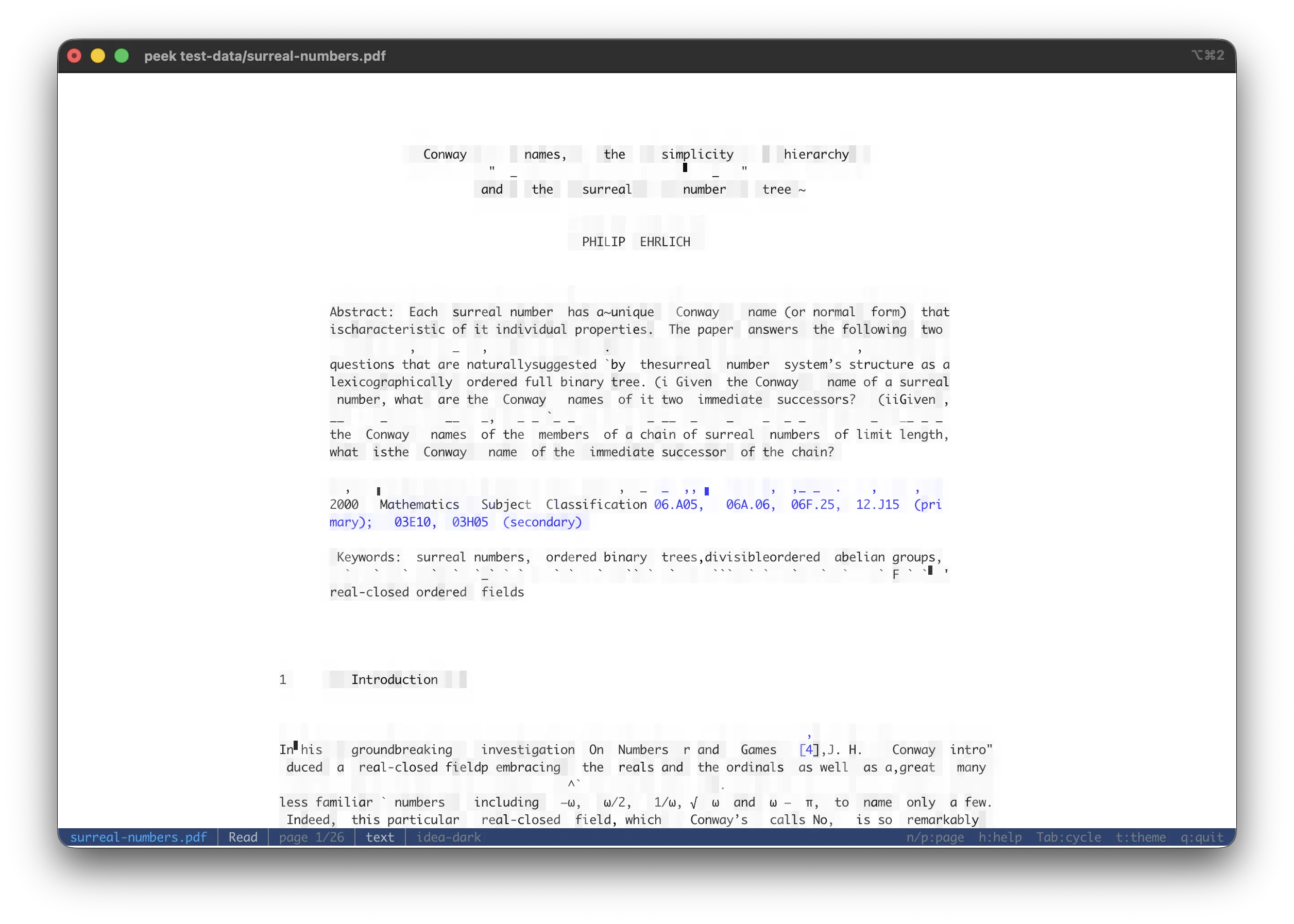
The Read view with the reconstructed-text overlay (
o): rasterized page cells underneath, the PDF's own words written over them at their page positions. -
Text — width-wrapped text extraction across the whole document, separated by muted
--- Page N ---markers. Present only when the document has a text layer; image-only scans and outlined-vector artwork (.ai) have none, so the tab is omitted rather than shown empty. -
Embeds — listing of every extractable inner item. Covers
/EmbeddedFilesattachments (attachments/<name>) and per-page inline image XObjects (pages/page{N}/image{M}.{ext}).Enter/eextracts the selected entry as a memory-backed source that re-enters peek (an attached CSV opens in a CSV view, an inline image renders as ASCII art, …). Hidden when the PDF has neither attachments nor inline images. -
Info — PDF version, title, author, subject, keywords, description, creation / modification dates, page count, attachment count, inline-image count, and an encrypted flag when set.
Print mode (--print) walks every page in order separated by blank lines. cat file.pdf | peek
detects the %PDF- magic and routes through the PDF mode stack.
Encrypted / password-protected PDFs surface the open error in the Info section instead of crashing.
EPS & PostScript
.eps (Encapsulated PostScript) and .ps (PostScript) files. PostScript is a program rather
than a plain image, so peek shows whatever it can extract or render, in up to four views.
Modes
Cycled with Tab:
- Preview (default when present) — many EPS files are "binary DOS-EPS" containers with a raster preview (usually TIFF) baked in by the design tool. peek renders that preview through the image pipeline. It's instant and needs no interpreter, so it's the default view when available. Zoom / pan via the standard keys.
- Render — a true Ghostscript rasterisation of the
PostScript, shown only when a
gsinterpreter is found on yourPATH. Higher fidelity than a baked preview (it interprets the actual vector program). It renders lazily — thegssubprocess only runs when you switch to this tab, so opening a file is never blocked on it. - Source — the PostScript program text. For a binary DOS-EPS, the PostScript section is shown rather than the raw binary wrapper.
- Info — DSC header metadata (title, creator, for, creation date, bounding box, language level, page count), the embedded preview's format and dimensions, and whether Ghostscript is available.
A file with no embedded preview and no gs on your PATH opens straight to Source + Info.
Ghostscript
peek never bundles Ghostscript (it's a large GPL/AGPL C dependency). To enable the Render
view, install it yourself and make sure gs is on your PATH:
# macOS
brew install ghostscript
# Debian / Ubuntu
sudo apt install ghostscript
The Info view's "Render" line tells you whether peek found it.
Limitations
- Multi-page
.psdocuments render only the first page. - WMF previews are detected but not rendered (no pure-Rust rasteriser) — install
gsfor those. - Legacy pre-CS2 Illustrator files (pure PostScript) open through this viewer but aren't specifically labelled as Illustrator.
Ebooks
| Format | Extension | Spec |
|---|---|---|
| EPUB | .epub | EPUB 3 — a ZIP container with HTML chapters + OPF metadata |
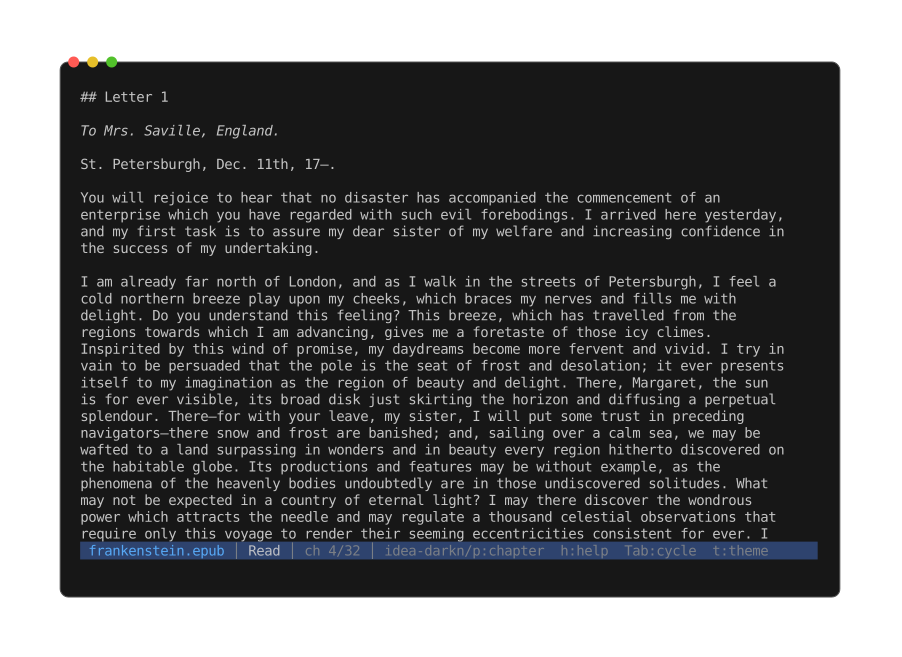
EPUB
Three views, cycled with Tab:
- Read (default) — one chapter at a time via the shared HTML rendering pipeline (same
html2textdriver as the standalone HTML viewer).n/pstep forward / back through the spine; the status line showsch X/Y. Each rendered chapter is cached at the current width so stepping back is instant; a terminal resize re-renders only the visible chapter.<img>tags with empty / missingaltget a fallbackimage: <basename>label. Cover-style chapters (almost no text + at least one image) render the first image as ASCII inline, sopeek book.epubopens on the cover. - TOC — the raw ZIP file tree. Useful for inspecting cover images, stylesheets, or the OPF
/ NCX metadata files. Recursive peek with
Enteropens any selected entry. - Info — Dublin Core metadata from the OPF: title, author (
dc:creator), language, publisher, date, identifier, description, plus spine length.
Print mode walks every chapter in spine order separated by blank lines, so
peek book.epub | less renders the whole book.
Other ebook containers (MOBI, AZW3, FB2) are not yet supported.
Images
Raster images render as ASCII art with 24-bit color, using glyph-matched character selection.

The default full mode: every terminal cell picks the glyph and foreground/background colors
that best match the pixels beneath it.
| Format | Extensions |
|---|---|
| PNG | .png |
| JPEG | .jpg, .jpeg |
| GIF | .gif |
| BMP | .bmp |
| WebP | .webp |
| TIFF | .tiff, .tif |
| ICO | .ico |
| AVIF | .avif |
| PNM | .pnm, .pbm, .pgm |
| TGA | .tga |
| OpenEXR | .exr |
| QOI | .qoi |
| DDS | .dds |
Decoded via the image crate.
Render modes
Cycle with m (or --image-mode <mode>):
| Mode | Description |
|---|---|
full | All glyphs (block, quadrant, extended) — default |
block | Block / quadrant elements + ASCII subset |
geo | Block / quadrant elements + line segments only |
ascii | Legacy luminance-based density ramp (for terminals without blocks) |
contour | Sobel edge detection rendered as line-art |
--edge-density tunes the contour line count.
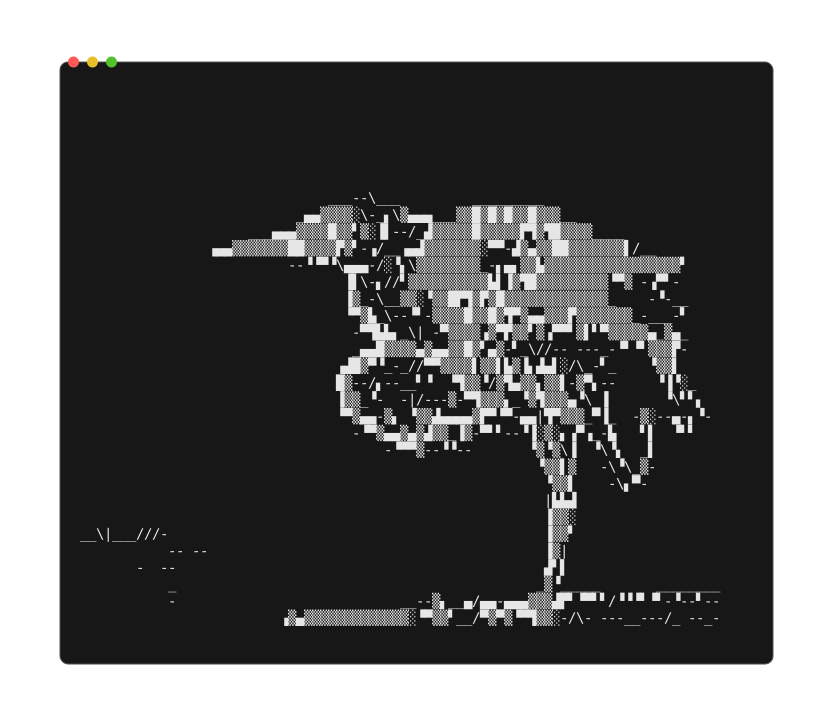
The same photo in contour mode — Sobel edge detection drawn as line-art instead of filled
color.
Backgrounds
Images with transparency need a compositing background before ASCII rendering. Without one, transparent regions default to black, making dark content invisible on dark terminals.
Cycle with b (or --background <mode>):
| Background | Description |
|---|---|
auto | Dark content → white bg, light content → black (default) |
black | Solid black |
white | Solid white |
checkerboard | 8×8 gray Photoshop-style pattern |
Fit modes
Cycle with f:
| Mode | Behavior |
|---|---|
Contain | Fit within both axes — whole image shown (default) |
FitWidth | Width fills the terminal; height grows freely → vertical scroll |
FitHeight | Height fills the terminal; width grows freely → horizontal scroll |
Pipe / --print output always uses Contain. The regular
scroll keys move the overflowing axis: vertical under
FitWidth, horizontal under FitHeight; top / bottom jumps go to top-left / bottom-right.
Zoom
See Zoom & pan for keys and behaviour.
Animated GIF / WebP
Auto-plays at native frame rate. Space toggles play/pause, n / p step frames, e
extracts the current frame as a PNG. Print mode renders the first frame. Frame stats appear in
the file info screen.
Info view
Dimensions, megapixels, color mode, bit depth, ICC profile, HDR detection (Ultra HDR gain map markers), animation stats, EXIF, XMP metadata.
EXIF fields surfaced: camera make/model, lens, orientation, resolution/DPI, exposure, aperture, ISO, focal length, flash, white balance, date taken, GPS, artist, copyright. XMP scraped from head bytes for Dublin Core / XMP fields (title, subject, description, creator, rights, rating, label).
SVG
SVG (.svg) is vector; rasterized via resvg before
ASCII rendering.
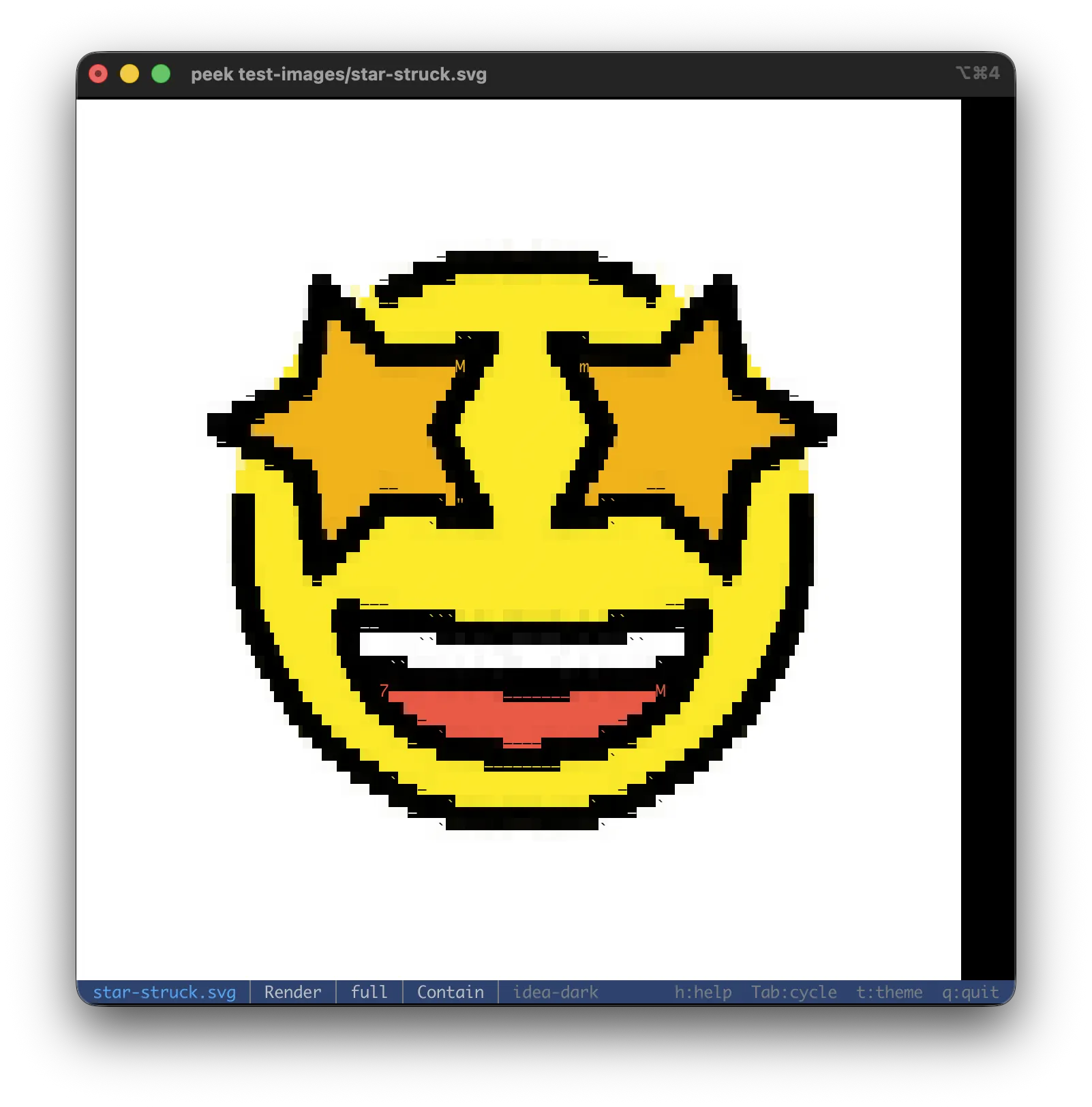
Two viewing modes (cycle with Tab):
- Rendered preview (default) — rasterized and run through the image pipeline.
- Source — XML syntax-highlighted (pretty or raw).
Re-renders on terminal resize.
Animation
CSS @keyframes animation is supported. The parser collects each @keyframes rule plus
inline-style animation-* references on elements, builds a merged frame timeline (one frame
per stop for steps() timing, ~30 fps interpolated for linear), and rasterizes each frame on
demand. A bounded LRU cache (64 entries) keeps a full second loop free.
Covers what termsvg / asciinema-svg-style files use: transform: translateX/Y/translate under
steps() or linear timing. Targets resolve via inline style="..." or flat CSS selectors
(tag, .class, #id, tag.class); combinators, pseudo-classes, attribute selectors, and *
are silently dropped. SMIL (<animate>, <animateMotion>) is still not supported.
--no-svg-anim forces the static render.
Space plays / pauses, n / p step frames, e extracts the current frame as PNG.
The Info panel reports frame count, total duration, and looping vs one-shot.
Info view
viewBox, declared dimensions, element counts (paths, groups, rects, circles, text), script / external-href flags, animation summary, plus source text stats.
Audio
Metadata-only view — no playback, no waveform. Container + codec params come from a symphonia probe; tag fields from ID3v1/v2, Vorbis comments, MP4 atoms, and APE.
| Format | Extensions | Status |
|---|---|---|
| MP3 | .mp3 | |
| FLAC | .flac | |
| Ogg Vorbis | .ogg, .oga | |
| Opus | .opus | |
| WAV | .wav, .wave | |
| MPEG-4 audio | .m4a, .m4b, .m4p | |
| AAC (ADTS) | .aac | |
| AIFF | .aiff, .aif, .aifc | |
| Apple CAF | .caf | |
| Matroska audio | .mka | |
| WMA | .wma | Container-only — symphonia doesn't decode WMA |
Views
Tab cycles between:
- Info — duration, codec, sample rate, channels, channel layout, bit depth, bitrate, and the Tags section (title, artist, album, album-artist, track / disc number, date, genre, composer, comment).
- Cover — embedded album art rendered as ASCII through the image pipeline. Prefers the FrontCover-tagged picture, falls back to the first available. Hidden when no art is embedded.
- Lyrics — embedded
USLT/SYLT/LYRICS=text. Hidden when none present. - Embeds — listing of every embedded blob:
pictures/<usage>.<ext>per visual (front / back / artist / leaflet / …) pluslyrics/lyrics.txt.e/ Enter extracts; extracted picture bytes re-enter peek and render as ASCII, lyrics re-enter as plain text.--extract pictures/front_cover.jpgdumps the cover.
Archives
Container archives open in a TOC view — one row per entry with permissions, uncompressed size, mtime, and path. Listing reads only the per-entry headers, so multi-GB archives open instantly.
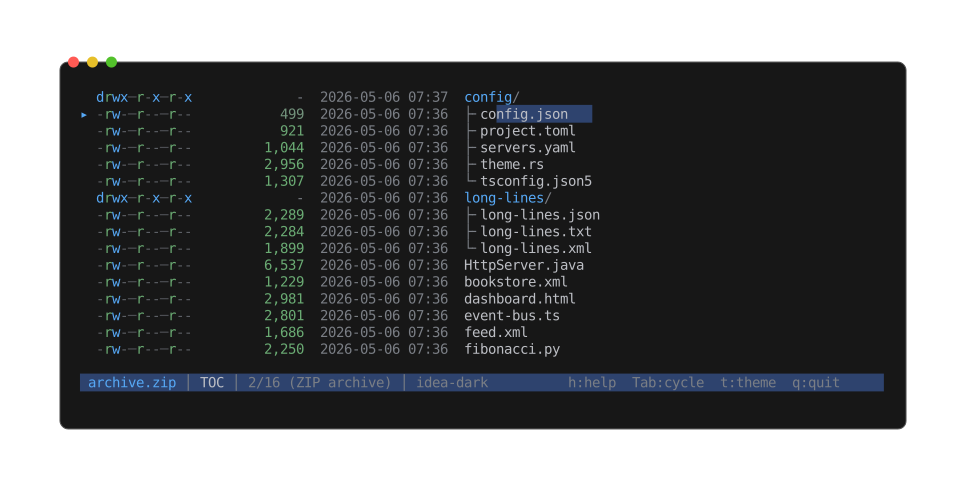
The interactive TOC browser: entries shown as a nested tree (directories with ├╴ / └╴
children), with permissions, size, and mtime per row. Move the cursor to descend into an entry
and preview it, or extract it.
| Format | Extensions | Spec |
|---|---|---|
| ZIP | .zip, .jar, .war, .apk | PKWARE APPNOTE |
| Tar | .tar | POSIX ustar |
| Tar + gzip | .tar.gz, .tgz | |
| Tar + bzip2 | .tar.bz2, .tbz2 | |
| Tar + xz | .tar.xz, .txz | |
| Tar + zstd | .tar.zst, .tzst | |
| Tar + lz4 | .tar.lz4, .tlz4 | |
| Tar + brotli | .tar.br, .tbr | |
| 7-Zip | .7z | 7-Zip format |
| cpio | .cpio (+ .cpio.gz) | newc / ODC headers; old-binary not supported |
| ar / Debian | .ar, .deb, .a | Unix ar(1) archive (also Debian binary packages) |
Navigation
The regular scroll keys move a file-selection cursor (skipping directories). The selected leaf gets a highlighted background + arrow marker. Top / bottom jump to the first / last file; paging scrolls a screenful and snaps the selection to the first visible file.
A sticky parent breadcrumb pins the current top row's ancestor chain to the upper viewport
rows when scrolled. Toggle with s.
Enter descends into the selected entry (recursive peek — opens it through the full peek
pipeline as if it were a standalone file). e extracts; see
Extraction.
Info view
Entry count, file count, directory count, total uncompressed size. Listing failures (corrupt archive, unsupported variant) surface as a warning row.
When an ar archive turns out to be a static library — its members are object files (.a /
.lib) — the Info view adds a Static library section with the object-member count and the target
architecture. A non-object ar archive like a .deb doesn't show it.
Single-stream compression
Bare codec wrappers (without a tar inside) decompress transparently — peek opens straight to the inner content rendered as whatever it actually is (source, JSON, image, …), and the Info view adds a Compression row showing the codec plus before / after sizes.
| Format | Extension |
|---|---|
| gzip | .gz |
| bzip2 | .bz2 |
| xz | .xz |
| zstd | .zst |
| lz4 | .lz4 |
| brotli | .br |
There is no fixed decompressed-size cap; output over 16 MiB spills to a tempfile to bound RAM. A decompression bomb above 8 GiB — or any corrupt or truncated stream — surfaces a warning and the viewer falls back to a hex view of the raw compressed bytes.
Brotli is the one exception to magic-byte detection: a raw brotli stream carries no signature,
so .br / .tar.br are recognised by extension only — a brotli stream piped through stdin
without a filename won't be auto-detected.
Comic archives
| Format | Extension | Spec |
|---|---|---|
| CBZ | .cbz | Comic book ZIP — a ZIP of page images |
Modes
Cycled with Tab:
- Read (default) — one page at a time via the shared image pipeline.
n/pstep pages, the status line showspage X/Y. Zoom / pan via the standard keys (Zoom & pan). Per-page cache keyed by(cols, rows, style, image-mode, background, fit); resizing or cycling render settings re-renders only the visible page. - TOC — the raw ZIP file tree.
Enteropens any selected entry as a standalone file. - Info — format, page count, total uncompressed image bytes.
Print mode walks every page in order separated by blank lines.
Pages are detected by image extension (png, jpg, jpeg, webp, gif, bmp, tif,
tiff), __MACOSX/ entries are skipped, and the list is sorted by name.
Other comic-archive containers (.cbr / .cb7 / .cbt) are not supported.
Disk images
| Format | Extension | Spec |
|---|---|---|
| ISO | .iso | ISO 9660 (+ Joliet, El Torito) |
| DMG | .dmg | Apple Disk Image — UDIF |
| Raw | .img, .bin, .dd | MBR partition table walk; no recognised filesystem header |
Both parsers are hand-rolled — no extra crate. Hex view (x) still works on the raw image
bytes.
ISO
Opens to a TOC view: one row per file / directory with size, mtime, and 8.3 / Joliet name; depth tracked by indented tree glyphs. The walker reads the root directory extent from the PVD (or SVD when Joliet is present — preferred for longer Unicode names) and recurses through child extents. Bounded depth + entry caps defend against malformed images.
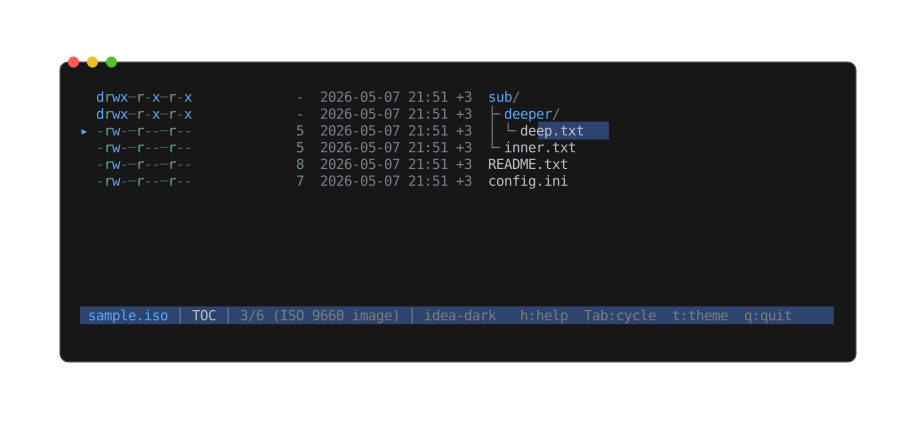
The same interactive TOC browser as archives — here a multi-level tree (sub/ ├╴deeper/ │ └╴deep.txt) read straight from the ISO 9660 directory extents.
Per-entry permissions are not surfaced (Rock Ridge SUSP isn't parsed); defaults are
rwxr-xr-x for dirs and rw-r--r-- for files.
Entries can be extracted via --extract <path> or e in the viewer. ISO extract is
zero-copy — a FileRange view over the backing image, no decompression, no buffering.
The Info view surfaces volume label, volume set, system ID, publisher, data preparer, application, volume size in blocks, and the four PVD timestamps (creation / modification / expiration / effective). Joliet and El Torito presence are flagged.
DMG
Opens straight to the file info screen — there's no listing path because the inner filesystem (HFS+ / APFS / FAT) would need its own walker.
The Info view parses the 512-byte "koly" trailer at the end of the file: UDIF version, image variant (device / partition / mounted system), total uncompressed size, data-fork length, embedded XML partition-map size, segment number / count, data + master checksum algorithms, and the documented trailer flag bits (flattened, internet-enabled).
It also decodes the partition map from the embedded plist — one small read, no payload
bytes. Real filesystems (Apple_HFS, Apple_APFS, …) each get a detail block; the format
scaffolding (protective MBR, primary/backup GPT header + table, free-space gaps) collapses into
one Partition scheme block, one line each. Nothing is hidden — the split just puts the real
content first. Each row carries its image offset (the byte position mount -o offset=, dd skip=, or mmls would select on). Example:
Partitions    8 (1 filesystem, 7 scheme)

── Partition · HFS+ ───────────────────
  Name          disk image (Apple_HFS : 4)
  Type          HFS+ (Apple_HFS)
  Logical size  596.33 MiB
  Stored        159.64 MiB (27% of logical)
  Compression   zlib · 3.7×
  Chunks        408 (1 raw, 4 ignore, 403 zlib)
  Image offset  20,480 B (sector 40)

── Partition scheme ────────────────────
  MBR                512 B · zlib · @ 0 B
  Primary GPT Header 512 B · zlib · @ 512 B
  free space         3.00 KiB · sparse · @ 17,408 B
  ...
Walking each partition's inner filesystem (HFS+ / APFS) is a separate, deferred effort — the compression runs are read for their structure, not decompressed. DMG extract is likewise unsupported.
Raw
Generic raw disk images (.img / .bin / .dd) that don't match a recognised filesystem
header. The Info view parses the MBR partition table when one is present (partition type,
boot flag, LBA offset, sector count) and otherwise falls back to a raw image label.
Listing isn't supported — opening the inner filesystem would need a per-FS walker. Hex view
(x) works on the raw bytes.
Directories
peek <dir> opens a one-level listing instead of erroring on "is a directory". Columns mirror
the archive TOC view: permissions, size, mtime, name.
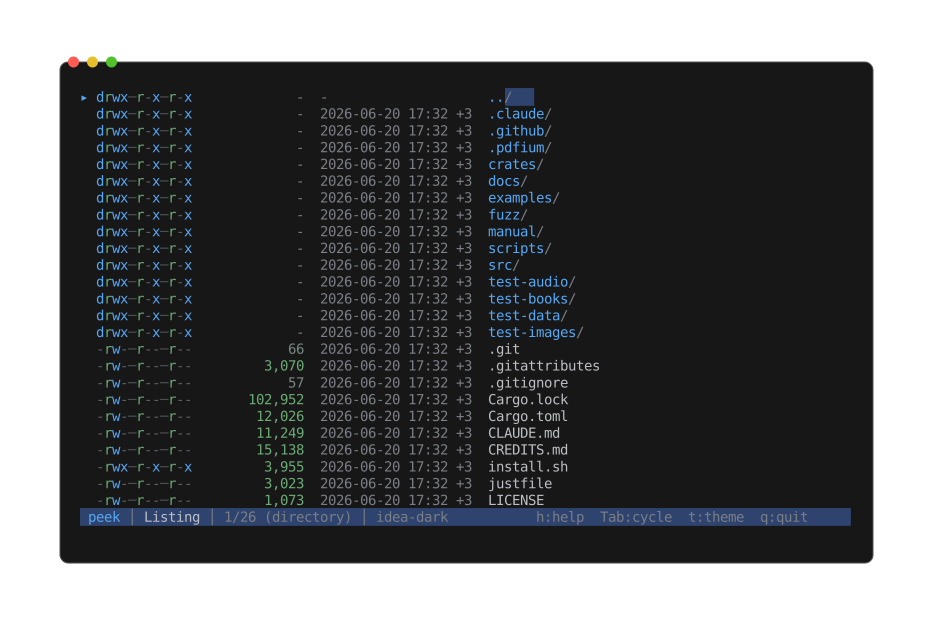
Browsing the project root: directories first (trailing /), then files, with a synthetic ..
row to walk back up. Enter descends into the selected entry.
Sorted dirs-first, then by case-insensitive name. A synthetic .. row leads the list
(suppressed at filesystem root) so the user can walk back up — selecting .. canonicalizes
the current path and re-targets to its parent. Walking back up lands the cursor on the
subdirectory you came from rather than the top of the list, so stepping in and out of sibling
directories stays put where you were.
| Key | Action |
|---|---|
Enter | Descend (file → push frame; directory → re-target current frame) |
Backspace | Up to the parent directory (cursor lands on the directory you came from) |
Esc | At a directory listing, exits peek |
Hidden entries are included. Symlinks are followed for kind classification; broken symlinks
still show as l, and other special files (sockets, FIFOs, devices) show as ?.
--print and --list both render the listing.
Object files
Executables, shared libraries, relocatable objects, and WebAssembly modules — ELF,
Mach-O, PE / COFF, and .wasm — open in a dedicated viewer rather than the binary hex
fallback. Detection is by magic bytes, so an extensionless binary like /bin/ls is recognised
without a .elf / .exe extension. WebAssembly functions surface in the Symbols view.
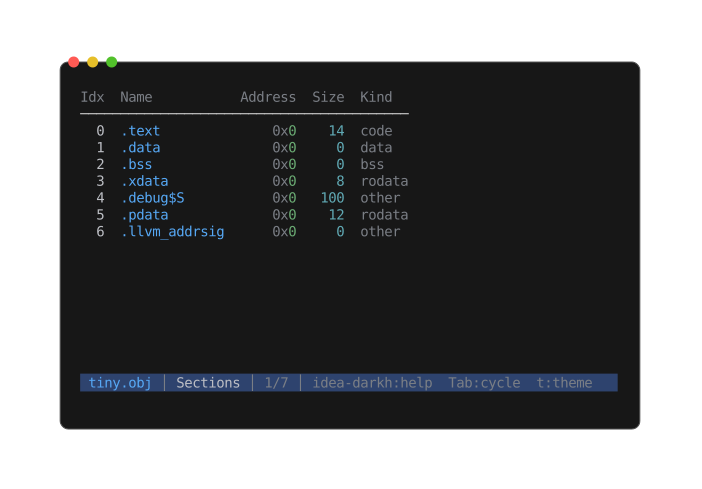
Views
Tab cycles three views:
- Info — the header summary: format, architecture, kind (executable, relocatable object,
dynamic library, core dump), 32- or 64-bit, endianness, entry point, section and symbol counts,
whether debug info is present, the build identity (ELF build ID, Mach-O UUID, or PE PDB GUID),
and the shared libraries the file links against (ELF
DT_NEEDED, Mach-O dylibs, PE imports — shown only when the file has any). - Sections — a table of every section: index, name, address, size, kind.
- Symbols — a listing of every symbol: address, size, type, bind, name.
Enterjumps the Hex view straight to the selected symbol's byte offset, so you can go from a name to its bytes in one keystroke (the landed byte is highlighted). Symbols with no on-disk location — undefined imports, or.bssdata — list with a muted address and don't jump. When the file is stripped, the dynamic symbol table is shown in place of the missing.symtab.
Navigating sections and symbols
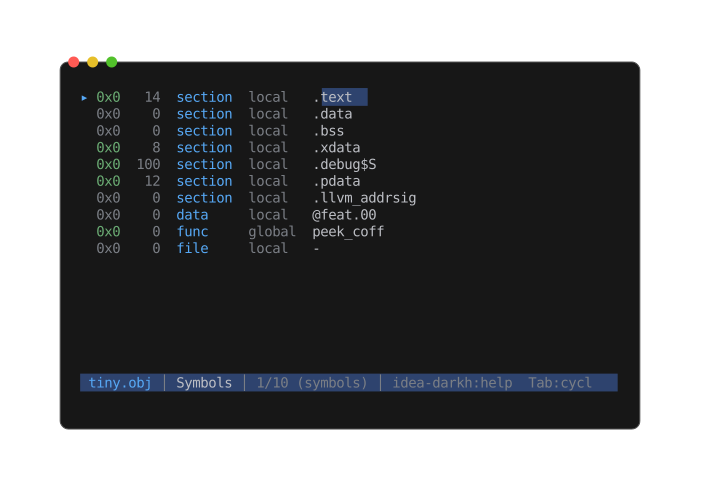
- The Sections table keeps its column header pinned at the top while the body scrolls; column widths fit their content.
Left/Rightpan both views — symbol names are often wider than the terminal./searches names;n/pstep through matches, scrolling or panning only as far as needed to bring each hit on screen.tcycles the theme; both views recolour in place.
Universal (fat) Mach-O
A universal Mach-O carries several architecture slices in one file. peek parses the slice matching your machine and lists every slice in the Info view.
Bare COFF .obj files (no dedicated magic) are recognised by validating the COFF header, so a
Wavefront .obj 3D model — which shares the extension but is text — still opens as text.
Limitations
Sections and symbols are views, not extractable files — there is no e extract here, and the
symbol row's Enter jumps within the file rather than opening anything. peek --list on an object
file prints the symbol table (address, size, type, bind, name) as a readable nm-style dump — handy
on stdout, but there are no extract keys to pipe into --extract.
Java classfiles
Compiled Java classes — .class files — open in a dedicated viewer rather than the binary hex
fallback. Detection is by magic bytes, so a classfile is recognised even without the .class
extension.
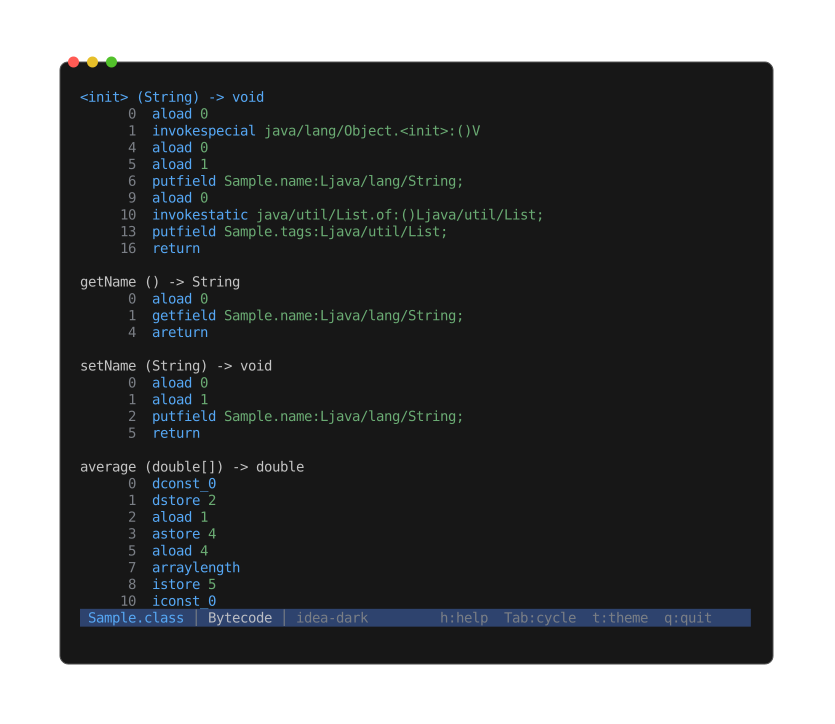
Views
Tab cycles four views:
- Info — the class header: name, superclass, implemented interfaces, JDK version, kind (class / interface / enum), the source file it was compiled from, and field and method counts.
- Fields — a table of every field: modifiers, type, name.
- Methods — a table of every method: modifiers, name, signature. Type descriptors are
decoded to source form —
(String, int) -> int, not the raw(Ljava/lang/String;I)I. - Bytecode — a
javap -c-style disassembly of every method: byte offset, mnemonic, and operand (method / field references resolved, simple branch targets shown as absolute offsets,tableswitch/lookupswitchsummarised by entry count).nandpjump to the next / previous method;/searches the listing.
The Fields and Methods tables behave like the object-file tables: a pinned column header,
Left / Right column pan, and / search.
Limitations
Fields and methods are views, not extractable files, so there is no e extract here.
Certificates and keys
Certificate and key files open with a rich Info sidecar that decodes the cryptographic
material: X.509 certificates, certificate signing requests (CSRs), certificate revocation lists
(CRLs), private keys (RSA / EC / Ed25519 / DSA / PKCS#8), public keys, OpenSSH public-key files
(.pub), and JSON Web Keys. The source view depends on the container: PEM shows its text, a JWK
shows the pretty-printed JSON, and raw DER is binary so it gets the Info sidecar and the
hex dump only.
A PEM file may contain many entries — a fullchain bundle, for example, holds one or more
certificates plus an intermediate. A JWK Set holds one key per keys member; a DER file is a
single entry. Every entry is decoded and rendered as its own block in the Info section.
Detection
- By extension —
.pem/.csr/.crl/.key/.p7b/.p7c/.pub(PEM),.der(DER),.jwk/.jwks(JWK). - By content — anything that starts with
-----BEGIN(any label, PEM), an OpenSSH algorithm prefix (ssh-rsa,ssh-ed25519,ecdsa-sha2-…, including the FIDO/U2Fsk-*variants), a binary DER certificate, or a JSON object whosektyis a known key type.
.crt and .cer are intentionally not routed by extension because they carry either
encoding. A PEM-encoded one is picked up by the -----BEGIN sniff; a DER-encoded one is
recognised when its bytes decode as an X.509 certificate. (DER carries no label, so peek tries
certificate, then CRL, CSR, and key in turn.) A JWK saved as .json keeps the generic JSON view —
the JWK content sniff only applies to .jwk / .jwks, stdin, and extension-less files.
What you see
Per entry, the Info section surfaces:
- X.509 certificate — subject, issuer, serial, NotBefore / NotAfter, days remaining (painted
as a warning when ≤ 30 days; expired certs show as
expired N days ago), public-key algorithm- bits, signature algorithm, Subject Alternative Names (DNS / IP / email / URI), CA flag, self-signed flag, key usage, extended key usage, SHA-1 and SHA-256 fingerprints.
- CSR (PKCS#10) — subject, requested SANs, public-key algorithm + bits, signature algorithm.
- CRL — issuer, This Update / Next Update, revoked entry count, signature algorithm.
- Private key — label, key type (RSA / EC + curve / Ed25519 / DSA / opaque), bit size when
derivable. Encrypted (
ENCRYPTED PRIVATE KEY) andOPENSSH PRIVATE KEYblocks show structural info only — no password prompt. - Public key — label, key type, bit size (parsed from the SPKI envelope).
- SSH public key — algorithm, bits, comment, SHA-256 fingerprint matching
ssh-keygen -l. - JSON Web Key — type (RSA / EC / oct / OKP) and curve, bit size, algorithm, use, key operations, key ID, and the RFC 7638 thumbprint.
Decode failures don't suppress the rest of the section. A malformed block surfaces as a per-entry
Parse error row so one bad PEM in a chain doesn't hide the others. Unrecognised PEM labels
show as Unknown entries with the original label and the decoded DER body size.
Source view
The default view is the PEM text — exactly what the file contains. Tab or i jumps to Info.
Hex (x) is still available; for cert files it's rarely what you want, but it's there.
Limitations
PKCS#12 / PFX containers and encrypted PKCS#8 (password prompt) are not yet decoded. They're tracked as follow-up work.
Fonts
TrueType and OpenType font files open into a specimen view — a sample sentence rasterised through the font and routed through peek's ASCII image pipeline — paired with a rich Info section that decodes every standard OpenType metadata table.
peek Lobster-Regular.ttf
peek /System/Library/Fonts/Menlo.ttc
Supported formats
.ttf— TrueType outline fonts.otf— OpenType / CFF outline fonts.ttc/.otc— TrueType / OpenType collections (multiple faces in one file).woff/.woff2— WOFF 1.0 / 2.0 web fonts (unwrapped to their inner font before display)
Detection
- By extension — the four extensions above.
- By content — 4-byte magic at offset 0:
00 01 00 00(TrueType),true(Apple TrueType variant),OTTO(OpenType / CFF),ttcf(collection). Unnamed sources (stdin, archive entries) still classify.
Specimen view
The default open lands on a rasterised sample sentence. The current sampler is a hard-coded ASCII pangram plus digits, common punctuation, and a mixed-case alphabet line — enough to show baseline / x-height / cap height / descender shapes.
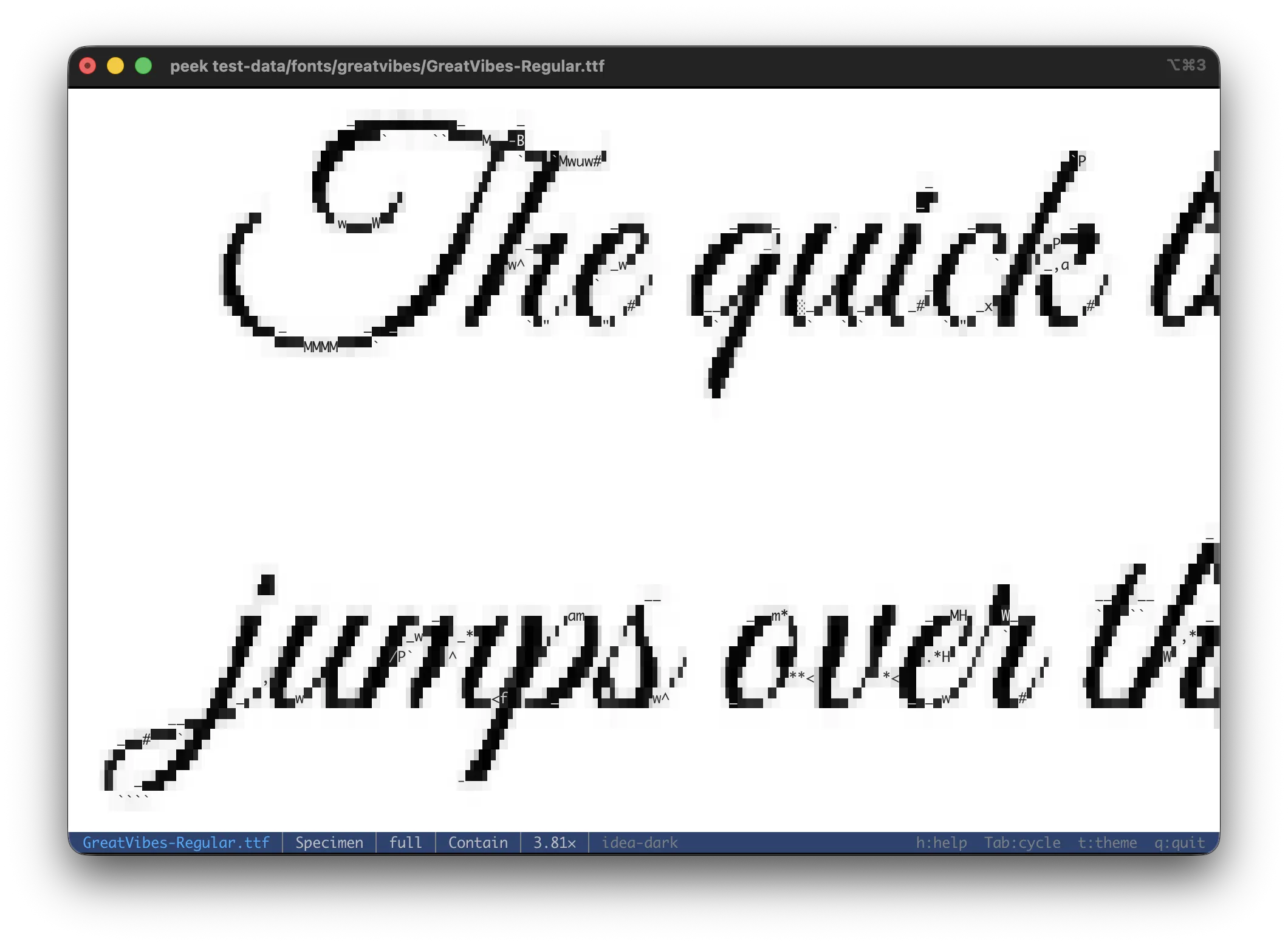
Every image-mode key works on the specimen:
| Key | Action |
|---|---|
m | Cycle image mode (full / block / geo / ascii / contour) |
b | Cycle background (auto / black / white / checkerboard) |
f | Cycle fit mode (contain / fit width / fit height) |
Zoom / pan keys (Zoom & pan) work on the specimen as well.
A font that the rasteriser can't parse silently falls through to the Info + Hex tail.
Font collections
For .ttc / .otc files, n / p step the active face through the specimen in place. The
status line shows Face N/M and updates as you cycle. The Info screen lists every face's
metadata block separately — so a four-face Apple system font like Menlo.ttc shows the
Regular, Bold, Italic, and Bold Italic variants in one screen.
Info
Per face, the Font section surfaces:
- Identity — family, subfamily (
Regular/Bold/Italic/ …), full name, Postscript name, version. - OS/2 classification — weight (
100..900with the canonical name shown alongside, e.g.400 (Regular),700 (Bold)), width class (Normal,Condensed,Expanded, …), italic flag, monospaced pitch flag. - Geometry — glyph count, units per em (design grid resolution).
- Coverage — Unicode codepoint count (summed across every cmap subtable), plus a script
list bucketed from cmap ranges:
Latin,Latin Extended,Greek,Cyrillic,Hebrew,Arabic,Devanagari,Thai,Hangul,CJK,Emoji,Symbols. The list reflects what glyphs the font carries, not what scripts it claims to support. - Rendering hints — hinting-present flag (set when
head.flagsbit 0 is set). - Attribution — designer, vendor URL, copyright, license URL (each row is skipped when the name table doesn't carry the field).
Apple system fonts (Menlo, San Francisco, …) still ship their canonical name records on the
Macintosh platform in Mac Roman; peek bundles the full Mac Roman upper-half mapping so ©
/ ™ / accented Latin characters round-trip cleanly.
What you don't see
- The source view is omitted — fonts are binary containers, so the universal hex aux mode
(
x) handles raw byte inspection. - The specimen sampler is hard-coded ASCII; multi-script samplers keyed on cmap coverage are planned.
- Faces in a
.ttccycle through the specimen in place; true recursive peek into a single face (its own viewer frame) would need to synthesise a standalone SFNT from the TTC table directory, also tracked as a follow-up.
.DS_Store
.DS_Store files are written by macOS Finder, one per folder it has displayed. They store
view settings, not your file contents — icon positions, window size and position, the view
style (icon / list / column), sort order, background, and modification dates. Finder leaves them
behind everywhere it browses, including network shares and the roots of archives, which is why
they so often turn up where you don't want them (and why repositories .gitignore them).
peek decodes the file's "Bud1" container — Apple's Buddy-allocator block store — and lists every
stored property. Detection is by magic bytes as well as the canonical .DS_Store name, so a
renamed or stdin-piped store is still recognised.
Views
Tab cycles two views:
- Records (default) — a table with one row per stored property: the File the setting
applies to (a child of the folder, or
.for the folder itself), a friendly Property name, the raw four-character Code, and the decoded Value. The table has a pinned header,Left/Rightcolumn pan, and/search. - Info — a summary: total records, how many distinct files they describe, and the folder's own view style and background when recorded.
Decoded values
Some properties are decoded into readable form rather than shown as raw bytes:
- Icon location (
Iloc) →(x, y)pixel coordinates, orauto. - Window frame (
fwi0) → the(left, top) – (right, bottom)bounds plus the view style. - View style (
vstl) →Icon view/List view/Column view/Gallery view/Cover Flow. - Background (
BKGD) →default,color #RRGGBB, orpicture. - Date modified (
modD/moDD) → a UTC date.
The bulk of a modern store's settings live in embedded binary property lists (bwsp, icvp,
lsvp); peek reports these as binary plist, N bytes rather than expanding them.
Limitations
Records are views, not extractable files, so there is no e extract. There is no source view —
the container is opaque binary; x still drops to the raw hex dump.
Binary
For files peek doesn't have a specialized viewer for — firmware, unknown formats — the
baseline is the hex dump viewer plus a file info screen reachable via
i / Tab.
(Executables — ELF, Mach-O, PE — and Java .class files have dedicated viewers; see
Object files and Java classfiles.)
Binary files default to the hex dump when interactive; piped binary streams a hex dump. The hex
view is reachable from any file type with x — see Hex dump.
File info
For binary files without a dedicated viewer, the Info view shows:
- File type / MIME (detected via magic bytes through the infer crate)
- Size (exact bytes + human-readable)
- Filesystem metadata (permissions, timestamps)
- Detected binary format from magic (SQLite, video, firmware, …)
File info
Every file type has an Info view, reachable via:
iin the viewer — jump straight thereTab— cycle into Info as one of the file's view modes--infoon the CLI — print info and exit
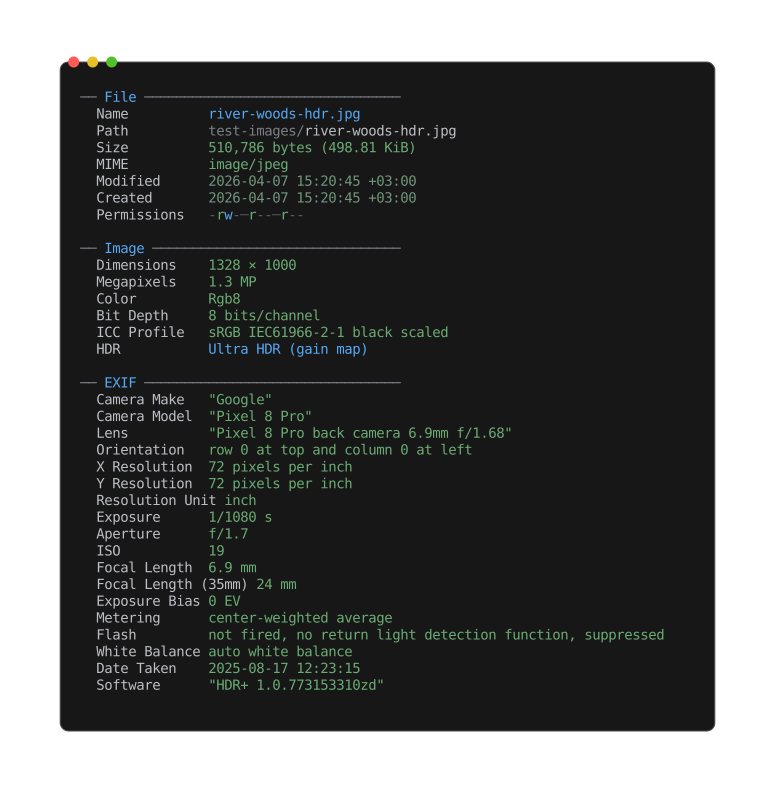
The Info view groups universal fields (name, size, MIME, timestamps) with format-specific sections — here the image's dimensions, color model, HDR gain map, and the camera / lens / exposure metadata read straight from EXIF.
Universal fields
- File — name, path, size (exact + human-readable)
- MIME — detected via magic bytes
- Permissions — per-character coloring
- Timestamps — created / modified / accessed, age-based coloring
Format-specific sections
| File kind | Info section adds |
|---|---|
| Text / source | Line / word / char counts, blank lines, longest line, line endings, indent style, encoding, shebang |
| Markdown | Heading counts, fenced code + langs, links, images, tables, list items, task progress, reading time |
| SQL | Dialect, statement counts by category, created-object inventory, comment count, PL/pgSQL flag |
| CSS | Rule count, selector count + per-kind histogram, @media / @keyframes / custom-property counts, @import list, colour swatch grid |
| Structured data | Top-level kind, key/element count, max nesting depth, total node count |
| CSV / TSV | Format, delimiter, encoding, header detection, per-column type inference, record count, malformed-row counter |
| Spreadsheet | Sheet count + names, title, author, subject, keywords, created / modified |
| SQLite | Page size, page count, encoding, journal mode, schema / user version, table / view / index / trigger counts, total rows, largest tables |
| XML / SVG | Root element, namespaces, element counts |
| Notebook | Format, kernel, language, cell counts (code / markdown / raw), output / image / error counts, max execution count |
| Image | Dimensions, megapixels, color mode, bit depth, ICC profile, HDR, EXIF, XMP |
| Animation | Frame count, total duration, average FPS, loop count |
| Audio | Container, codec, channels, sample rate, bit depth, bitrate, duration; tag fields |
| Document | Title, author, subject, keywords, dates, paragraph / word / image counts |
| Message count, From, To, Cc, Subject, Date, Message-ID, attachment count | |
| Calendar / contacts | iCalendar: name, event / todo counts, date range, version, product. vCard: contact count, version |
| PDF version, metadata, page count, attachment count, inline-image count | |
| EPUB | Dublin Core metadata, spine length |
| EPS / PostScript | Title, creator, created, BoundingBox, language level, page count, preview, render |
| Comic | Page count, total image bytes |
| Archive | Entry / file / directory counts, total uncompressed size |
| Directory | Entry / file / subdirectory counts |
| ISO | Volume label, system ID, publisher, application, four PVD timestamps |
| DMG | UDIF version, image variant, sizes, partition-map presence, trailer flags |
| Compressed wrap | Codec + size before / after |
| Object files | Format, architecture, type, class, endianness, entry point, section / symbol counts, debug info, build ID, linked libraries |
| Java classfile | Class, superclass / interfaces, kind, class-file version, source file, field / method counts |
| Certificate | Per entry: subject, issuer, serial, validity + days left, public key, signature, SANs, CA / self-signed, key usage, SHA-1 / SHA-256 fingerprints |
| Font | Format, face count, family, subfamily, version, weight, width, style, glyph count, units/em, codepoint coverage, scripts, hinting, designer, vendor, license |
| Binary | Detected format from magic (Mach-O, ELF, PE, SQLite, …) |
Use --utc to show timestamps in UTC instead of local + offset.
JSON output
peek <file> --info --json prints the info screen as a single JSON object instead of the themed
view — designed for shell pipelines:
peek report.pdf --info --json | jq .size_bytes
Core metadata is fully typed: size_bytes is a number, timestamps are ISO-8601 UTC strings
(independent of --utc), and each MIME entry carries a machine category. Absent fields (created
time, compression, warnings) are omitted rather than emitted as null. The format-specific stats are
nested under a per-type key (pdf, archive, image, …) with raw typed values and lowercase
tokens for enum fields. Per-type dates (pdf.created, an email's date, a document's
created / modified, …) are normalised to the same ISO-8601 UTC form as the core timestamps,
whatever shape the source file stored them in. --json requires --info.
The fields depend on the file type, but the overall shape is consistent:
{
  "file_name": "surreal-numbers.pdf",
  "path": "test-data/surreal-numbers.pdf",
  "size_bytes": 575907,
  "mimes": [
    {
      "mime": "application/pdf",
      "category": "registered"
    }
  ],
  "modified": "2026-05-09T07:27:14Z",
  "created": "2026-05-09T07:27:14Z",
  "permissions": "-rw-r--r--",
  "pdf": {
    "flavor": "pdf",
    "pdf_version": "1.5",
    "encrypted": false,
    "created": "2011-01-25T13:32:43Z",
    "page_count": 26,
    "image_count": 1
  }
}
Search
Press / to open a search prompt over the status line. Type a query, press Enter to run it.
n / p cycle forward / backward through matches (wrapping at the ends), scrolling each into
view. The status line shows cur/total while a search is active, or no match when nothing
hits.
Literal and regex
Matching defaults to exact substring. Ctrl-R inside the prompt toggles regex — a
linear-time engine with no catastrophic backtracking; the prompt title shows the active mode
(Search (literal) / Search (regex)). A malformed regex flashes the parse reason and leaves
the previous search untouched. While a regex search is active the count is prefixed with regex.
Regex matches per logical line, so ^ / $ anchor to line bounds and a pattern can't span a
line break.
Smart case
Both modes honour smart-case: an all-lowercase query matches case-insensitively; any uppercase character makes the whole query case-sensitive.
Match highlight
A match gets an explicit background and foreground pair — the syntax colour underneath is
dropped so matched text looks uniform regardless of what it was, then resumes after the span.
Both colours derive from the theme's accent hue: the current n / p match is vivid, the rest
muted.
Where it works
Search reaches every text-rendering view — source / plain text / structured raw-pretty / SVG XML, the rendered HTML view, the EPUB Read view, the DOCX / ODT / RTF Read views, the PDF Text view, the CSV / TSV Table view and the SQLite contents view that shares it, and every listing TOC. Two scopes differ from a plain text scan:
- Table views (CSV / TSV / SQLite) search per cell — a query can't span a delimiter.
- Listing TOCs (archives, ISO, directories, PDF embeds, …) match the last path segment
only, so
sub/finds nothing.
Clearing and limits
An empty-query Enter clears the search; so does Esc while a search is active (it clears matches
first, then falls through to normal back / quit on a second press). Search also clears when the
scanned line set changes underneath it — the raw/pretty toggle, an EPUB chapter step, or a
terminal resize.
The scan is a single pass over the active view, capped at 100,000 matches. The raw text scan and
the table-cell scan are additionally budgeted at 256 MB per query — past it the counts show as
partial (12/3400+) and a warning surfaces.
Planned: incremental search-as-you-type, reach into the file-info and hex views, and a lazy / bounded "search from here" pass for multi-GB files. See the project's
docs/planned.md.
Hex dump
Press x from any view to drop to a raw hex dump — useful for inspecting bytes regardless of
file type. Press x again to return to the previous primary mode. When hex is the default for a
binary file, no primary mode exists, so x is a no-op there.
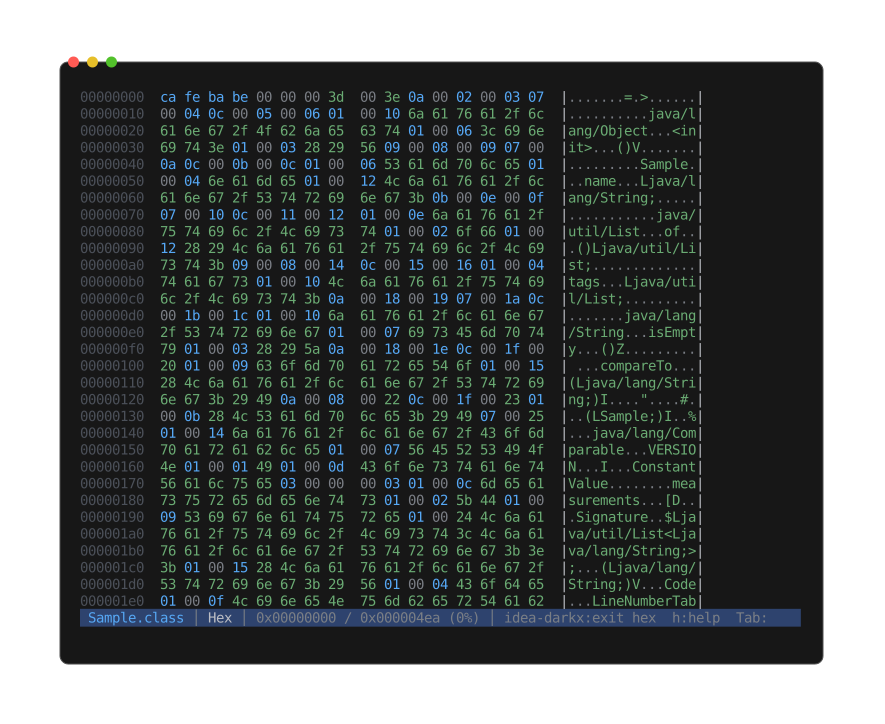
hexdump -C style: 8-digit offset, two hex columns of N/2 bytes separated by an extra space,
then a printable-ASCII column between |s. Bytes-per-row scales with terminal width:
14 + 4*bpr columns, rounded down to a multiple of 8, minimum 8. Pipe mode honors $COLUMNS
(≥ 24) or falls back to 80 columns (16 bytes/row).
Reads from disk on demand — no full-file slurp, no problem with multi-GB inputs.
The viewer tracks a logical Position (byte offset or line index) on switch-out and restores it
on switch-in. Entering hex from a text view positions the top at the byte offset corresponding to
the current line; returning to text re-aligns the line scroll.
Help and about
Two always-available overlay screens, on every file type.
Help
h or ? opens the help screen — the authoritative in-app keyboard reference. All bindings
derive from one source, so the screen never drifts from what the keys actually do.
The shortcut list is sectioned: a Global block first, then one block per loaded mode (its label as the heading) for that mode's extras. An EPUB file shows a Read section (chapter nav) and a TOC section (pin parent path) under separate headings, rather than one flat list. A mode's entry is dropped from its section when it duplicates a global key. The screen lists every mode the file has at once — it doesn't filter to the active mode.
The active theme name shows alongside the shortcuts.
About
a shows the gradient peek logo, version, tagline, the active theme's full palette as colored
swatches, and a short list of pointers (homepage, license, common keys). It doubles as a theme
showcase: cycle themes with t while on About to preview how each one paints the full palette.
The logo animates while About is open — the gradient slides across the wordmark in a ping-pong,
and every few seconds two bright runners trace the wordmark outline in opposite directions and
meet at the far edge. Space pauses / resumes the animation. In plain mode (--color plain, or
cycling to it with c) the animation is off — About paints the static logo and stops ticking
until color comes back.
Themes
Selectable via --theme <name> or PEEK_THEME. Default idea-dark.
| Theme | Description |
|---|---|
idea-dark | JetBrains IDEA default Dark (default) |
idea-light | JetBrains IntelliJ Light |
solarized-light | Solarized Light |
github-light | GitHub Light |
vscode-dark-modern | VS Code Dark Modern |
vscode-dark-2026 | VS Code Dark 2026 |
vscode-monokai | VS Code Monokai |
iceberg | Iceberg — cold bluish dark |
iceberg-light | Iceberg Light — cold bluish light |
graveyard | Gothic moonlit night |
candy-floss | Pastel candy on dark plum |
victorian | Parlour parchment with oxblood |
With no --theme / PEEK_THEME set, the default adapts to your terminal: peek probes the
terminal background (OSC 11) and picks idea-light on a light background, idea-dark on a dark
one. Only when output is a terminal — piped output keeps the dark default. An explicit theme
always wins.
Press t (or T for reverse) in the interactive viewer to cycle live. Cycling repaints the
whole UI in the new theme — syntax-highlighted code, info screens, help, gradient logo,
everything.
The About screen (a) doubles as a theme showcase: cycling themes while on About previews how
each one paints the full palette. The animated logo can be paused / resumed with Space.
How it works
Each theme is a TextMate .tmTheme embedded at compile time. Syntect uses it for syntax
scopes; peek derives a set of semantic UI roles (heading, label, value, accent,
muted, warning, gutter, search_match, selection) from the theme's settings + scopes,
so non-code UI stays in keeping with the syntax colors.
--help --theme <name> works as a theme preview — the help screen itself is themed.
Color modes
Set with --color / -C, or PEEK_COLOR. Press c / C in the viewer to cycle live.
| Mode | Encoding |
|---|---|
truecolor | 24-bit RGB (\x1b[38;2;r;g;bm) — default |
256 | xterm 256-color palette (\x1b[38;5;Nm) |
16 | 16 base ANSI colors (\x1b[3Nm / \x1b[9Nm) |
grayscale | 24-bit luminance only — preserves shading |
plain | No escapes — strip all color from the output |
All callers paint truecolor RGB; the color mode owns the conversion and is the single point where the encoding is decided. Image rendering routes through the same point, so ASCII-art images downgrade along with everything else.
Plain mode emits text content with zero ANSI escapes (no SGR resets), so piped output is safe to compose with other tools:
peek -C plain README.md | wc -l
peek --color plain src/main.rs > stripped.rs
Line numbers and wrap
Line numbers
Off by default. Enable at startup with -n / --line-numbers; toggle with l in the viewer.
Right-aligned gutter, minimum width 2 digits, painted in the theme's gutter color. In pretty mode the numbers count visible pretty-printed lines (the lines actually shown), not source byte lines.
Soft wrap
On by default for text views (source, structured pretty/raw, plain text, SVG XML). Each visible
logical line is sliced into visual rows of width term_cols - gutter_width, so the row budget
accounts for wrapped continuations and the status line never scrolls out of view.
Toggle with w. When wrap is on, the vertical scroll keys
move one visual row at a time — long lines no longer make a single keypress jump over all
their wrapped rows.
The line-number gutter shows the real (logical) line number on the first segment; continuation rows have a blank gutter of the same width so wrapped content aligns under its first row.
Status bar shows Wrap whenever soft wrap is on (a deliberate always-on reminder — most status
segments surface only non-default state, but wrap shows even though on is the default).
Horizontal scrolling
Companion to wrap-off mode: Left / Right pan the viewport horizontally by 8 columns per
press (less -S feel). Active only when wrap is off — wrap-on makes Left/Right inert because
content is already fully visible. The gutter does not pan; it stays anchored to the left edge.
Zoom and pan
Shared across every image-rendered view: raster images, animated GIF / WebP, animated SVG, PDF Read, CBZ Read, and font specimens.
Keys
| Key | Action |
|---|---|
+ / - | Zoom in / out (1.25× per step, capped at 16×) |
0 | Reset zoom to 1× and pan to origin |
1..9 | Jump to whole-number zoom (1× .. 9×) |
| Arrows | Pan the zoomed viewport (or fit-mode scroll at 1×) |
Anchoring
Zoom anchors on the viewport centre — the pixel under the centre stays put across + / -,
so the content you're looking at stays under your eyes instead of drifting toward a corner.
Rendering
The visible viewport's pixel ROI is cropped from the native-resolution source and rescaled per draw, so memory stays viewport-sized at any zoom level — a 200 MP photo at 9× costs the same working set as the same photo at 1×.
For SVG, the source is re-rasterised as zoom grows so glyphs stay crisp rather than turning into upscaled pixels.
Pan vs scroll
Arrow keys do different things depending on whether the view is zoomed:
- Zoomed in (> 1×) — arrows pan the zoomed viewport.
- At 1× — arrows fall back to fit-mode scroll:
FitWidthlets vertical arrows scroll the overflow,FitHeightlets horizontal arrows scroll,Containshows the whole frame so arrows are inert.
Print mode
Pipe output and --print always render at 1× — zoom is interactive-only.
Extraction
Pull an inner item out of a container as a standalone file.
Sources
- Archive entries (ZIP, tar [+ gz/bz2/xz/zst/lz4/br], 7-Zip, cpio, ar) — extract a single file
by its inner path. Entries ≥ 16 MiB spool to a temporary file in
$TMPDIR/peek-*(random- access reads without holding the whole payload in RAM); smaller entries stay in memory. The temp file is unlinked automatically when the extracted view is closed. - ISO entries (
.iso) — zero-copy via aFileRangeview over the backing image. No decompression, no buffering, multi-GB ISOs unaffected. - Email attachments (
.eml) — extract a single MIME attachment by its inner path as a memory source that re-detects through the recursive-peek pipeline. - PDF embedded files (
/EmbeddedFilesattachments) — extracted as a memory source. - PDF inline images —
pages/page{N}/image{M}.{ext}pseudo-paths for image XObjects. - Audio embeds —
pictures/<usage>.<ext>per visual, pluslyrics/lyrics.txt. - SQLite entities —
<kind>/<name>.sqlfor an entity'sCREATE …DDL,<kind>/<name>.csvfor a table or view's contents (streamedSELECT *). - Spreadsheet sheets —
<sheet>.csvstreams one worksheet to CSV; raw ZIP-container paths extract the underlying workbook part. - Document & presentation embeds (DOCX / ODT / RTF / PPTX / PPTM / PPSX / ODP / Keynote) — extract an embedded image by its inner path.
- Directory entries — resolve a listed child name against the directory path and hand back
the file itself (
..walks up one level); the result re-detects like any other file. - Animation frames (
.gif,.webp, animated SVG) — extract a single composited frame as a PNG at the source's native pixel size (sub-512px SVG scales up to 512 on the longest axis; override with--extract-size).
CLI
peek <file> --extract <KEY> [-o PATH]
<KEY>is an entry path for archives / ISOs / PDFs / audio, or a 1-based frame index for animations.-o PATHoverrides the suggested filename.-o -(or piping stdout) streams raw bytes.
Adding --print or --info instead replaces the active source with the extracted item and
runs the rest of the pipeline against it — recursive peek:
peek archive.zip --extract foo.py --print              # syntax-highlight the inner file
peek song.mp3 --extract pictures/front_cover.jpg --info  # info screen on the embedded cover
Viewer
In a listing TOC, e extracts the selected file. In an animation, e extracts the current
frame. Either way, a status-line prompt opens prefilled with a suggested filename — Esc
cancels, Enter writes. Path safety rejects traversal (..) before any TOC lookup.
DMG extract is intentionally unsupported — UDIF block decompression is a separate effort.
--no-tempfile
Pass --no-tempfile to force the archive extract path to keep payloads in RAM instead of
spooling. This bypasses the safety cap that normally rejects a memory-only entry past 256 MiB,
so use only when you'd rather risk OOM than touch $TMPDIR (read-only filesystem, exotic
sandbox, etc.).
CLI options
| Option | Short | Description |
|---|---|---|
--help | -h | Show help (short form; --help prints the long form) |
--version | -V | Show version info and exit |
--print | -p | Force print mode (direct stdout) |
--plain | -P | Sterile output: no highlighting, pretty-printing, or colors |
--raw | -r | Output verbatim source (no pretty-print) |
--theme | -t | Syntax highlighting theme — see Themes |
--color | -C | Output color encoding (truecolor / 256 / 16 / grayscale / plain; default truecolor) — see Color modes |
--language | -L | Force syntax language |
--width | -w | Image rendering width in characters (0 = auto-fit, capped at 2048; default 0) |
--image-mode | -m | Image render mode (full / block / geo / ascii / contour; default full) |
--background | Image transparency background (auto / black / white / checkerboard, alias checker; default auto) | |
--margin | Image margin in transparent pixels (default 0) | |
--cell-aspect | Override terminal cell aspect ratio (height ÷ width) | |
--edge-density | Tune contour line count (image-mode contour; default 0.1) | |
--no-svg-anim | Force static render for animated SVG | |
--info | -i | Print file info and exit |
--json | Emit --info as JSON for pipelines (requires --info) | |
--list | -l | Print container TOC to stdout (archives, ISOs, directories, PDF / EPUB / DOCX / ODT / RTF / audio / comic embeds) |
--utc | Show timestamps in UTC (default: local + offset) | |
--line-numbers | -n | Enable line numbers (toggle with l in the viewer) |
--extract | -x | Extract a single inner item — see Extraction |
-o / --output | Output path for --extract (or - for stdout) | |
--extract-size | Output pixel size for animation / SVG frame extract | |
--no-tempfile | Keep archive extracts in RAM (skip the $TMPDIR spool path) | |
--yes | -y | Pre-grant slow ops: skip the load prompt for big compressed files |
--update | Check for newer release and re-run install.sh |
Notes
--plainis the single "sterile output" knob: implies--color plainand additionally disables syntax highlighting and structured pretty-printing. HTML and SVG drop their rendered / rasterized view and fall back to raw source; other rich views (image, PDF, DOCX, EPUB) still compose but render without color. Use it when piping into tools that expect bytes-as-typed.--rawis narrower: it skips pretty-printing of structured / SVG sources but keeps colors, font styles, and rich renders. Pair--raw --color plainif you want raw structure without colors but still want HTML / SVG rendered.--print/-pforces print mode regardless of TTY.--json(with--info) prints the info screen as a single JSON object for shell pipelines —peek file.pdf --info --json | jq .size_bytes. Core metadata is typed (numbers stay numbers, timestamps are ISO-8601 UTC); per-type stats are nested under a key named for the file type (peek book.pdf --info --json | jq .pdf.page_count).--yes/-ypre-grants slow operations. A big transparently-compressed file (.gz/.xz/.zst/ …), or a compressed-tar archive whose table of contents needs a full decompression pass (.tar.gz/.tar.xz/ …), opens on its Info screen with anEnter to …hint instead of doing the slow work up front;Enterruns it and unlocks the session (later large files in the same session won't re-ask). Extracting or descending into a large container entry (over 256 MB) likewise asks a yes/no confirm before spooling.--yesskips these prompts, and every non-interactive path (pipe,--print,--info,--list) is always pre-granted since it can't answer a prompt. Independent of the prompts, a hard 8 GiB ceiling on the tempfile-spill path makes a decompression bomb fail cleanly instead of filling$TMPDIR.--help --theme <name>doubles as a theme preview — the help screen is themed.
Help screens
-h(concise) — gradient logo, version + tagline, usage line, common options.--help(full) — everything in-h, plus rarely-used options (theme, color, language, width, image-mode, background, margin, utc) and the full theme listing with the active marker.
Both are custom-themed — not the default clap output.
Environment variables
| Variable | Description | Default |
|---|---|---|
PEEK_THEME | Syntax highlighting theme | idea-dark |
PEEK_COLOR | Output color encoding | truecolor |
PEEK_VERSION | Pin a specific release for install.sh | latest |
PEEK_INSTALL_DIR | Install location for install.sh | ~/.local/bin |
COLUMNS | Terminal width fallback for piped / --print output (≥ 24) | 80 if unset |
TMPDIR | Spool directory for large extract payloads (peek-*) | system default |
CLI flags override environment variables.