Source code
Source files render as syntax-highlighted text via syntect with two-face / bat extended grammars — 100+ languages including Rust, Python, JavaScript, TypeScript, C, C++, Java, Go, Ruby, Shell, TOML, Dockerfile.
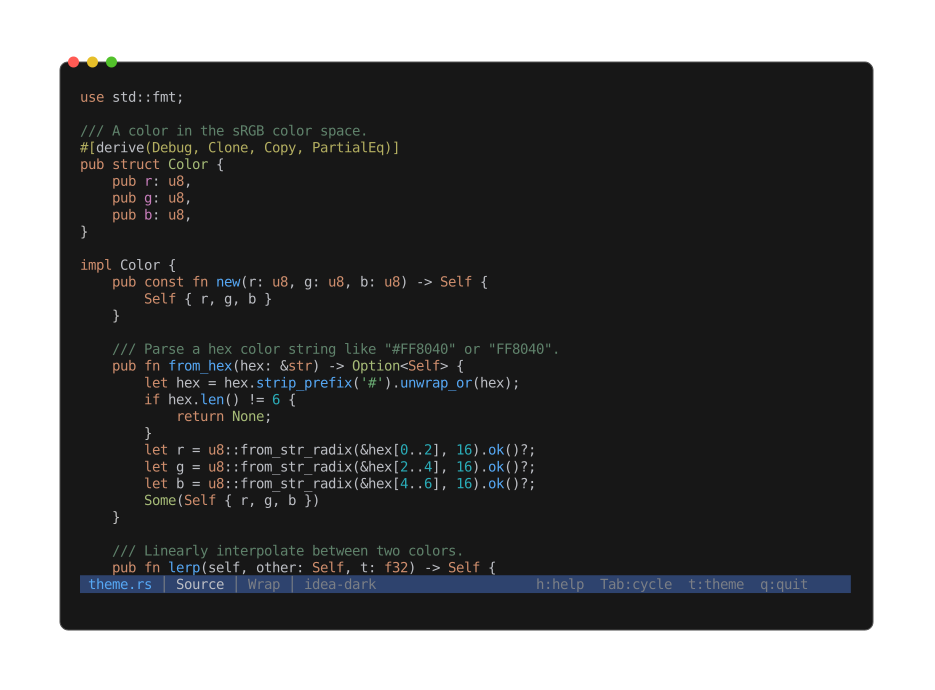
Highlighting applies automatically when you open a recognized source file; the theme follows the active color theme.
If detection misses, force a language with -L:
cat script | peek -L bash
peek -L rust unknown_file
Config files
Config files highlight through the same path — .ini, .cfg, .conf, .properties, .env,
.hcl, .tf, and by-name matches like Makefile, Dockerfile, .gitignore, and
.editorconfig. A few filename special cases cover gaps where the extension misleads or is
absent: .env.local / .env.production / .envrc highlight as .env, justfile uses the
Makefile grammar, and .dockerignore uses the gitignore grammar. Formats with no grammar
(.dhall, .cue) show as plain text.
Line numbers
Off by default. Enable at startup with -n / --line-numbers, or toggle with l in the viewer.
Soft wrap
On by default. Toggle with w. When off, Left / Right pan the viewport horizontally
(less -S feel).
SQL
.sql / .ddl / .dml / .psql / .pgsql files render as highlighted source. The Info view
adds an SQL section: dialect guess (PostgreSQL / MySQL / SQLite / T-SQL / generic), statement
count broken down by category (DDL / DML / DQL / TCL / Other), inventories of created objects (tables,
views, indexes, functions, triggers), comment-line count, and a flag when an inline $$ … $$
PL/pgSQL block is present.
CSS
.css files render as highlighted source. The Info view adds a CSS section: style-rule count
(CSS nesting included), selector count with a per-kind histogram (class / id / element / pseudo /
attribute / universal), custom-property count, @media and @keyframes counts, and an @import
list — external URLs flagged. A Colors section shows the stylesheet's colour palette as block
swatches, most-frequent first. Colour words inside selectors, strings, or comments are not
mistaken for colours.