Hex dump
Press x from any view to drop to a raw hex dump — useful for inspecting bytes regardless of
file type. Press x again to return to the previous primary mode. When hex is the default for a
binary file, no primary mode exists, so x is a no-op there.
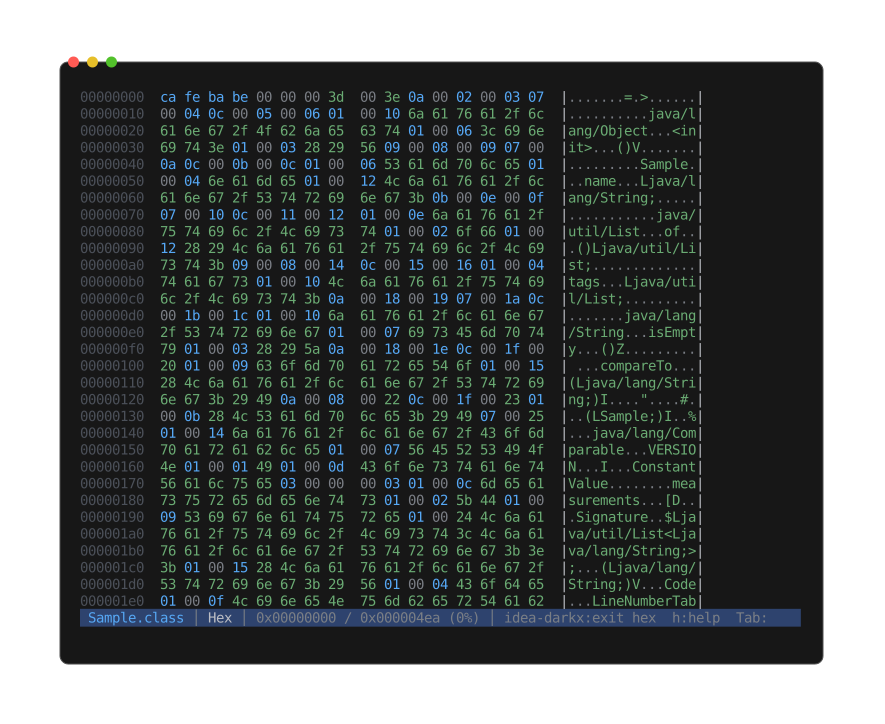
hexdump -C style: 8-digit offset, two hex columns of N/2 bytes separated by an extra space,
then a printable-ASCII column between |s. Bytes-per-row scales with terminal width:
14 + 4*bpr columns, rounded down to a multiple of 8, minimum 8. Pipe mode honors $COLUMNS
(≥ 24) or falls back to 80 columns (16 bytes/row).
Reads from disk on demand — no full-file slurp, no problem with multi-GB inputs.
The viewer tracks a logical Position (byte offset or line index) on switch-out and restores it
on switch-in. Entering hex from a text view positions the top at the byte offset corresponding to
the current line; returning to text re-aligns the line scroll.