Markdown
.md / .markdown / .mdown / .mkd / .mkdn / .mdwn files get a dual view, same as HTML
and PDF:
- Rendered (default) — pulldown-cmark drives a CommonMark + GFM walker that emits
width-wrapped, ANSI-styled text. Styled headings (with H1 / H2 underlines), bullet / ordered /
task lists (
☐/✓), blockquote rail, horizontal rules, tables as box-drawing, fenced code blocks syntect-highlighted by their declared language, emphasis / strong / strikethrough, inline code, links (text underlined + dim URL after), images, and footnote references and definitions. YAML (---) and TOML (+++) frontmatter render as a dim verbatim block at the top so the opening fence doesn't get mistaken for a horizontal rule. - Source — syntax-highlighted markdown source via
ContentMode. Reachable with Tab. Becomes the entry view with--raw.
--plain drops the rendered view entirely.
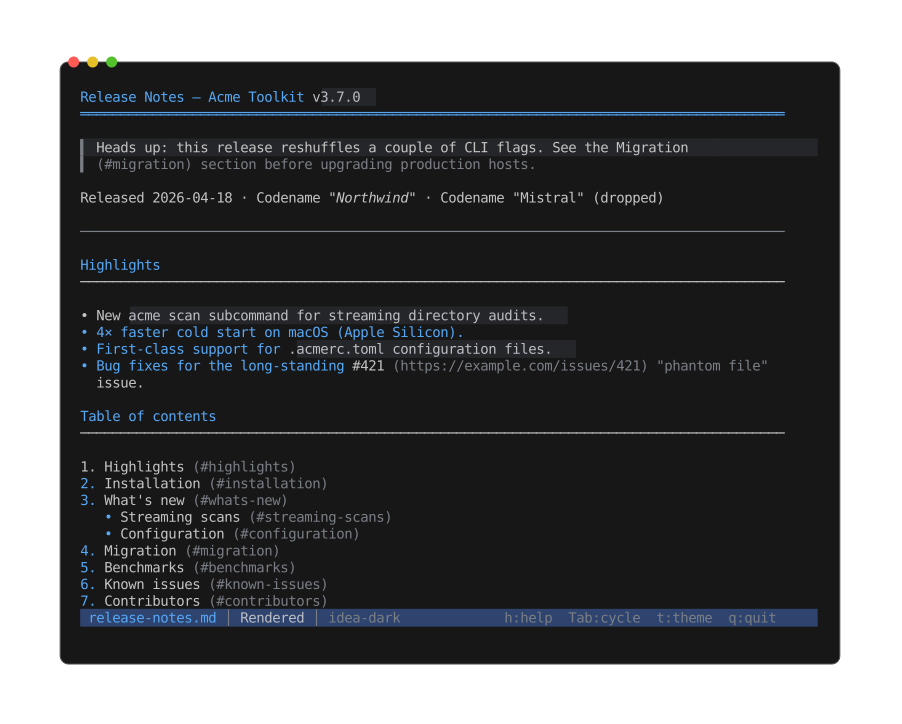
The default rendered view: headings, emphasis, strikethrough, blockquotes, and tables styled inline rather than shown as raw markup.
The Info view adds a Markdown section:
- Heading counts by level (H1..H6)
- Fenced code-block count + declared languages
- Inline-code / link / image / table / list-item counts
- Task-list progress (
done / total + percent) - Blockquote lines, footnote definitions
- Frontmatter detection (YAML / TOML)
- Prose word count (excludes fenced code)
- Reading-time estimate at 230 wpm