CSV / TSV
| Format | Extensions |
|---|---|
| CSV | .csv |
| TSV | .tsv |
peek renders CSV and TSV files as an aligned table: sticky header row at the top, body rows scrolled underneath, columns padded to a common width per column.
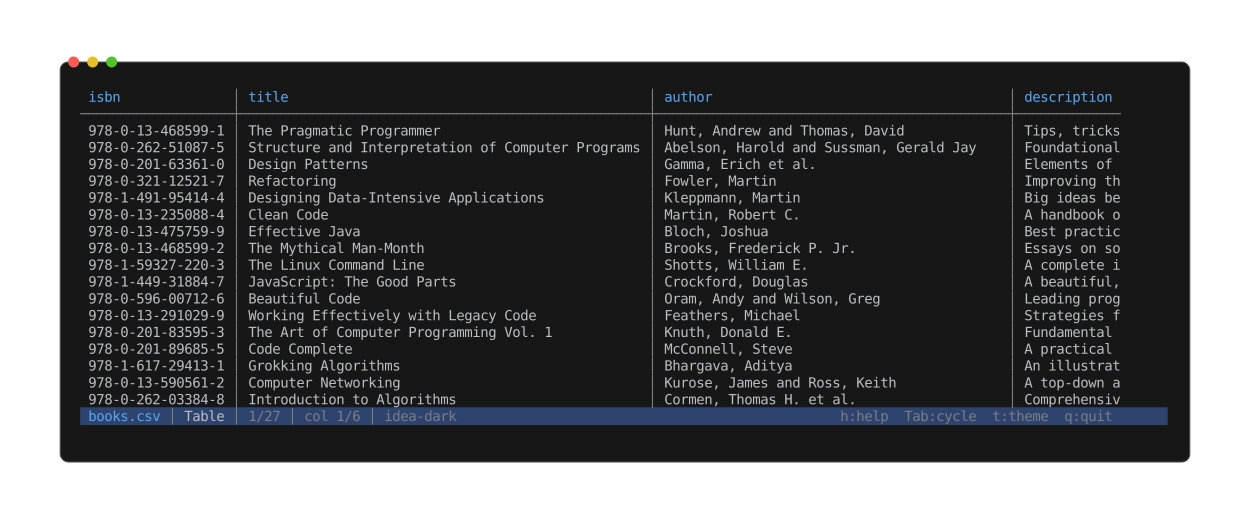
Columns are measured and padded to a common width; numeric columns right-align. The header stays pinned as you scroll the body.
View modes
- Table (default) — aligned columns with sticky header.
- Source — raw bytes through the text viewer.
- Info — per-column type inference, record count, malformed counter.
Tab cycles between them. x opens the hex view; h / ? show the help screen.
Column widths
Widths seed from the first 1000 records on open. As the user scrolls, columns grow monotonically — a wider cell scrolling into view bumps its column once and the new width stays (the sticky header repaints with the new layout so column titles stay aligned with the body). Columns never shrink on their own.
Shift+R reflows widths from the records currently visible in the viewport — the opt-in
shrink. One deliberate press beats constant automatic churn.
Cells wider than their column truncate with an ellipsis (…). The full value is visible in
the Source view.
Column alignment
Numeric columns (Int / Float only across the seed body) right-align so digits line up; everything else stays left-aligned. Alignment is inferred once from the seed and stays stable for the session — toggling the header doesn't reshuffle data alignment.
Multi-line cells
CSV records may embed \n inside a quoted cell. peek collapses each such cell to a single
visual row, replacing the embedded newline with a muted ↵ marker. Tabs become spaces and
carriage returns are dropped — none of those characters can break the terminal cursor or
push following columns onto the next row.
Header detection
Row 0 is treated as a header when every cell in row 0 looks like text (not int, float, bool, or ISO date). A typed cell in row 0 turns the heuristic off — clear signal that row 0 is data, not a label.
Shift+H toggles the header on / off, overriding the heuristic. When off, row 0 is body data
and the sticky region is empty.
Horizontal pan
If the table is wider than the terminal, Left / Right step one column at a time. The
sticky header pans in lockstep with the body. The status bar shows col N/total.
Delimiter detection
.csv defaults to comma, .tsv to tab. The first 64 KiB are sniffed for , / \t / ; /
|; if a non-default candidate outscores the default by 3× outside quoted spans, it
overrides — covers misnamed files.
Encoding
UTF-8 is native. UTF-16 LE and UTF-16 BE inputs are detected by BOM and transparently transcoded to UTF-8 at the byte-source boundary. The transcode holds the whole file in memory (unlike the streaming UTF-8 path), so it is capped at 32 MB — a larger UTF-16 file opens with the raw Source view only, and a warning explains why the table view is missing.
Malformed records
A record that exceeds 4 MiB or spans more than 10 000 physical lines is treated as malformed (defends against unterminated quoted strings). The csv crate's per-record errors (column-count mismatch, bad quoting, bad UTF-8) fall into the same bucket.
Malformed rows render as a single <error> cell painted in the theme's warning color, and
the status bar shows the running malformed count.
Search
/ opens the search prompt. Matches are scoped to a single cell — a
query that would span the comma between two columns yields nothing.
Substring scan, smart-case (all-lowercase query → case-insensitive; any
uppercase → case-sensitive). Search reaches past the loaded rows — peek
pages through the records without loading them all into memory — but the
scan is budgeted at 256 MB of record data per query so a multi-gigabyte
CSV never freezes the viewer; a capped scan marks its counts as partial
(12/3400+, no match (partial scan)) and raises a warning. n / p
step through matches, wrapping at the ends; the viewport scrolls
vertically and pans horizontally to bring each match's cell into view.
Esc clears the search.
Print mode
peek --print foo.csv (or piping into another tool) emits the table to stdout using the
seed widths only — no auto-widen. A cell wider than its seeded column prints in full and
pushes the rest of that row past the terminal edge (terminal clips); the next row realigns.