| Format | Extension | Notes |
|---|---|---|
| Message | .eml | A single RFC822 / MIME message |
| Mailbox | .mbox | Many messages concatenated, each preceded by a From line |
Both parse with the pure-Rust mail-parser crate. peek also recognises a message by content, so
an extension-less file still opens here when it starts with a From separator (mbox) or an
RFC822 header block.
.eml — a single message
Cycled with Tab:
- Message (default) — a header block (From / To / Cc / Date / Subject, plus an attachment
count when the message has attachments) followed by the body. HTML messages render through the
same
html2textdriver as the HTML viewer; plain-text messages are word-wrapped to the terminal width. - Source — the raw RFC822 text.
--plainskips the rendered view and opens straight on the source. - Attachments (only when the message has any) — one row per MIME attachment with its content
type and size.
Press
eto extract the selected attachment to disk;Enteropens it with a recursive peek. - Info — the header summary (see below).
As with every file, x opens the hex dump and h / ? the help screen.
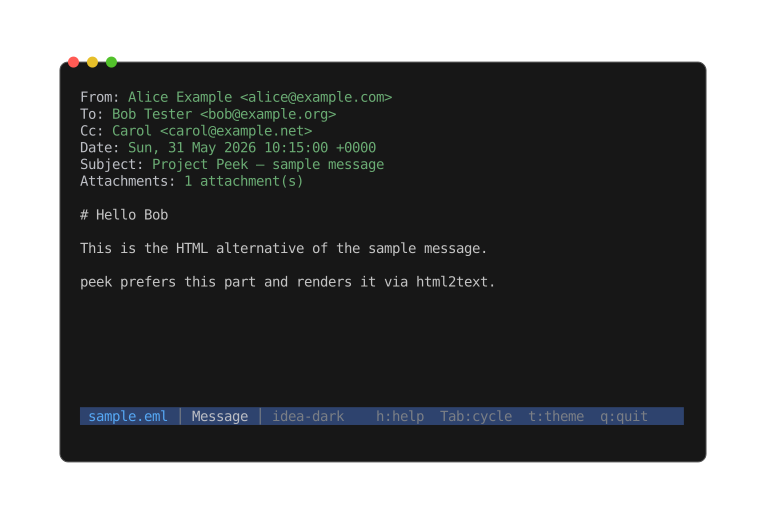
The default Message view: the header summary followed by the rendered body.
.mbox — a mailbox
The default view is a Messages list, one row per message (prefixed with its position so
duplicate subjects stay distinct, with the message date alongside). Press Enter to drill into a
message — it opens with the same views as a standalone .eml (Message, Attachments, Info, hex,
help), minus the per-message raw Source view: the mailbox's own raw text is the secondary
top-level view instead. The mailbox is read as a stream and only the opened message is parsed, so
even a very large mailbox lists instantly.
Info
The Info view shows the header summary plus the attachment count and total size (.eml), or the
message count (.mbox).