Object files
Executables, shared libraries, relocatable objects, and WebAssembly modules — ELF,
Mach-O, PE / COFF, and .wasm — open in a dedicated viewer rather than the binary hex
fallback. Detection is by magic bytes, so an extensionless binary like /bin/ls is recognised
without a .elf / .exe extension. WebAssembly functions surface in the Symbols view.
Views
Tab cycles three views:
- Info — the header summary: format, architecture, kind (executable, relocatable object,
dynamic library, core dump), 32- or 64-bit, endianness, entry point, section and symbol counts,
whether debug info is present, the build identity (ELF build ID, Mach-O UUID, or PE PDB GUID),
and the shared libraries the file links against (ELF
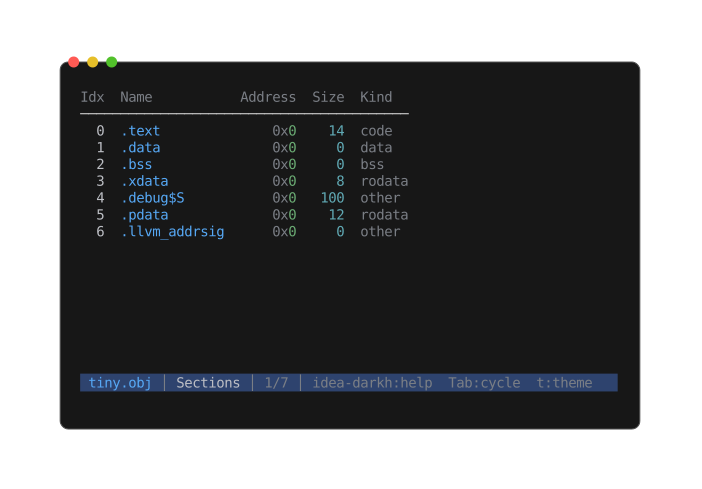
DT_NEEDED, Mach-O dylibs, PE imports — shown only when the file has any). - Sections — a table of every section: index, name, address, size, kind.
- Symbols — a listing of every symbol: address, size, type, bind, name.
Enterjumps the Hex view straight to the selected symbol's byte offset, so you can go from a name to its bytes in one keystroke (the landed byte is highlighted). Symbols with no on-disk location — undefined imports, or.bssdata — list with a muted address and don't jump. When the file is stripped, the dynamic symbol table is shown in place of the missing.symtab.
Navigating sections and symbols
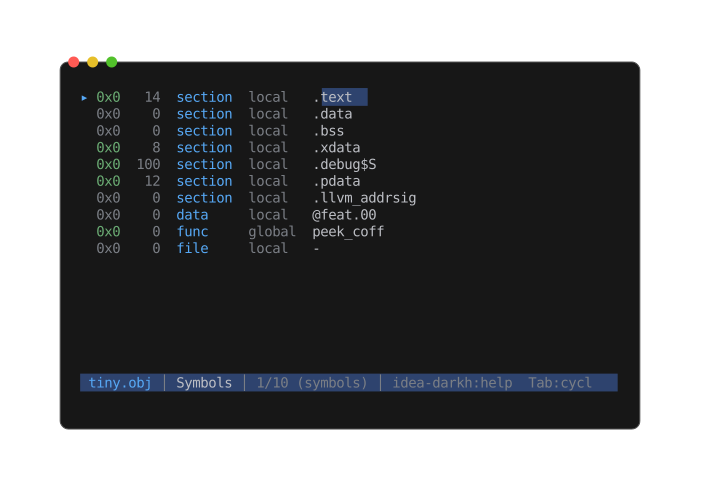
- The Sections table keeps its column header pinned at the top while the body scrolls; column widths fit their content.
Left/Rightpan both views — symbol names are often wider than the terminal./searches names;n/pstep through matches, scrolling or panning only as far as needed to bring each hit on screen.tcycles the theme; both views recolour in place.
Universal (fat) Mach-O
A universal Mach-O carries several architecture slices in one file. peek parses the slice matching your machine and lists every slice in the Info view.
Bare COFF .obj files (no dedicated magic) are recognised by validating the COFF header, so a
Wavefront .obj 3D model — which shares the extension but is text — still opens as text.
Limitations
Sections and symbols are views, not extractable files — there is no e extract here, and the
symbol row's Enter jumps within the file rather than opening anything. peek --list on an object
file prints the symbol table (address, size, type, bind, name) as a readable nm-style dump — handy
on stdout, but there are no extract keys to pipe into --extract.