Structured data
| Format | Extensions |
|---|---|
| JSON | .json, .geojson |
| JSONC | .jsonc |
| JSON5 | .json5 |
| JSON Lines | .jsonl, .ndjson |
| YAML | .yaml, .yml |
| TOML | .toml |
| XML | .xml |
Pretty vs raw
Two sub-modes, toggled with r (or --raw on the CLI):
- Pretty (default for JSON / JSONL / YAML / TOML / XML) — reformatted, with syntax highlighting.
- Raw — verbatim source, still highlighted unless
--plain/-Pis set.
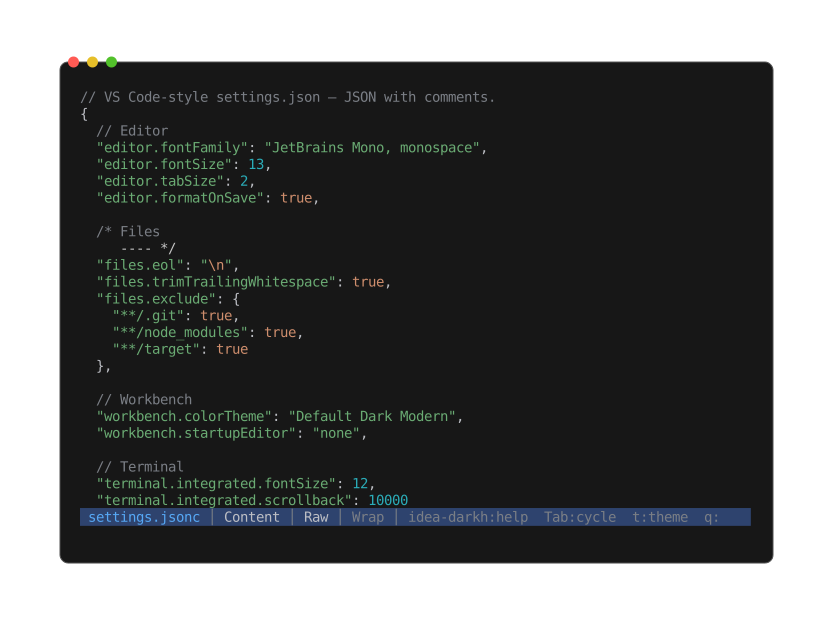
Keys, strings, numbers, and booleans each colored — comments preserved, source formatting intact (JSONC defaults to raw rather than pretty).
JSONC and JSON5 default to raw because the pretty path collapses comments and JSON5 syntax;
press r to opt into strict-JSON pretty when needed.
JSON Lines pretty: each non-empty line round-trips through serde_json separated by a blank
line.
Info view
Top-level kind, key/element count, max nesting depth, total node count. For XML, the root element name and declared namespaces.